
A company’s accounts can cover more than a year — most often its first accounts, which run from incorporation to the first year end, or the year it moves its year end later. Companies House normally accepts a period of account of up to 18 months. HMRC does not: a Corporation Tax accounting period can never be longer than 12 months.
So a long period of account gives you one set of statutory accounts but two Company Tax Returns (CT600s): one for the first 12 months and one for the rest. Tax Optimiser works this out from the period dates, splits the computation, builds both returns and files them together. You don’t set up a second period or a second set of accounts.
Why a long period needs two returns
A Corporation Tax accounting period ends 12 months after it starts, even if the accounts carry on. For a period of account from 1 January 2025 to 31 March 2026 (15 months), HMRC expects:
- Return 1 — 1 January 2025 to 31 December 2025, the first 12 months;
- Return 2 — 1 January 2026 to 31 March 2026, the remaining three months.
Each return has its own profits, its own tax calculation and its own payment date. Both are delivered with the same accounts, because there is only one set.
In Tax Optimiser the two returns are labelled Period 1 (the first 12 months) and Period 2 (the remainder).
How Tax Optimiser decides to split
There is nothing to switch on. When the Corporation Tax dates cover more than a year, the period is split automatically:
- Period 1 runs from the start date to the day before the first anniversary;
- Period 2 runs from the anniversary to the end date.
The Corporation Tax dates are the accounting period’s dates unless you override them. The CT Dates row on the period’s overview shows which: Same as accounting period, or the override dates with an Override badge.
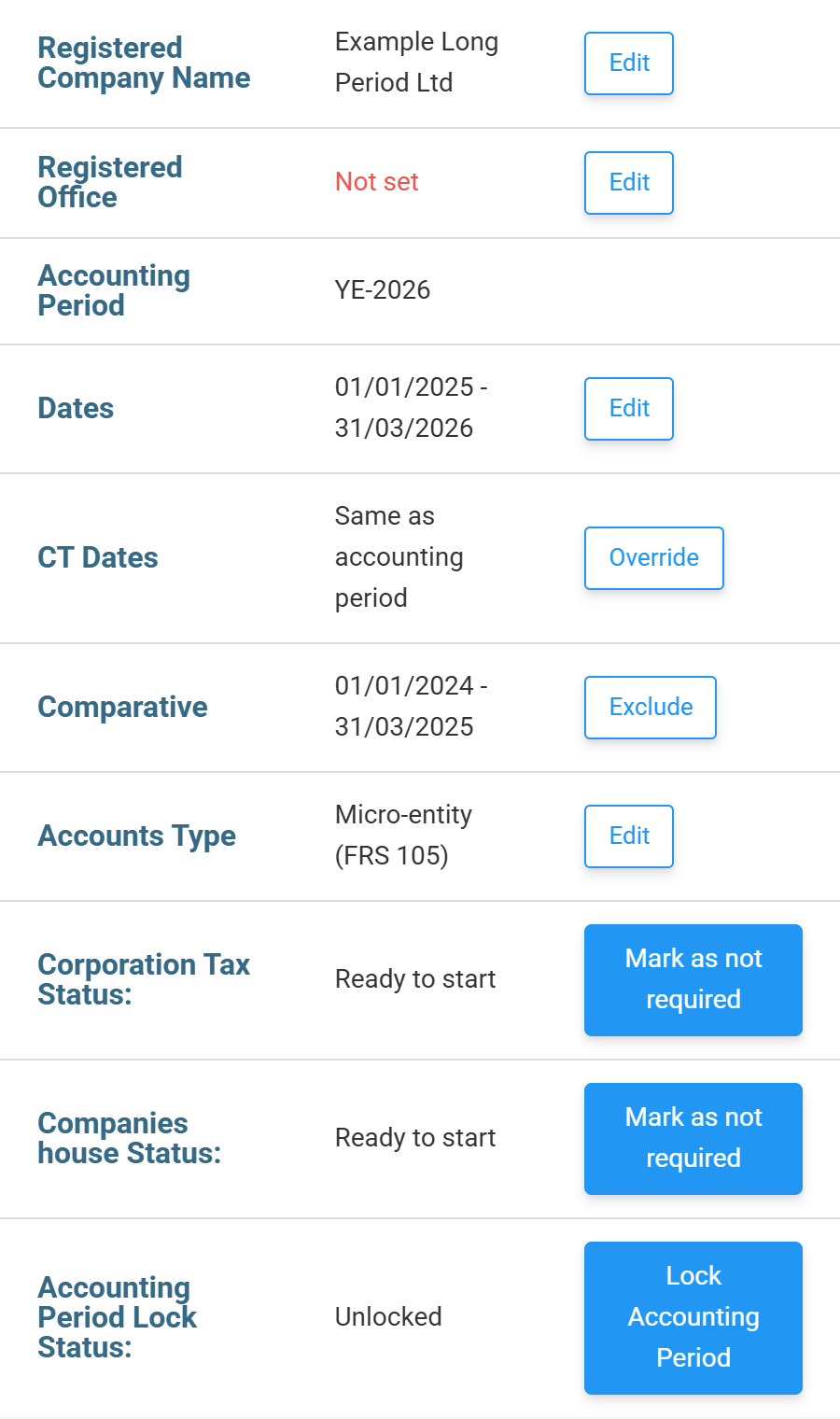
The override exists for companies whose Corporation Tax period starts later than their accounts — for example a company that was dormant after incorporation and only came within the charge to Corporation Tax when it started trading. Click Override and enter the CT Start Date and CT End Date. Both must fall inside the accounting period, and the statutory accounts are not affected.
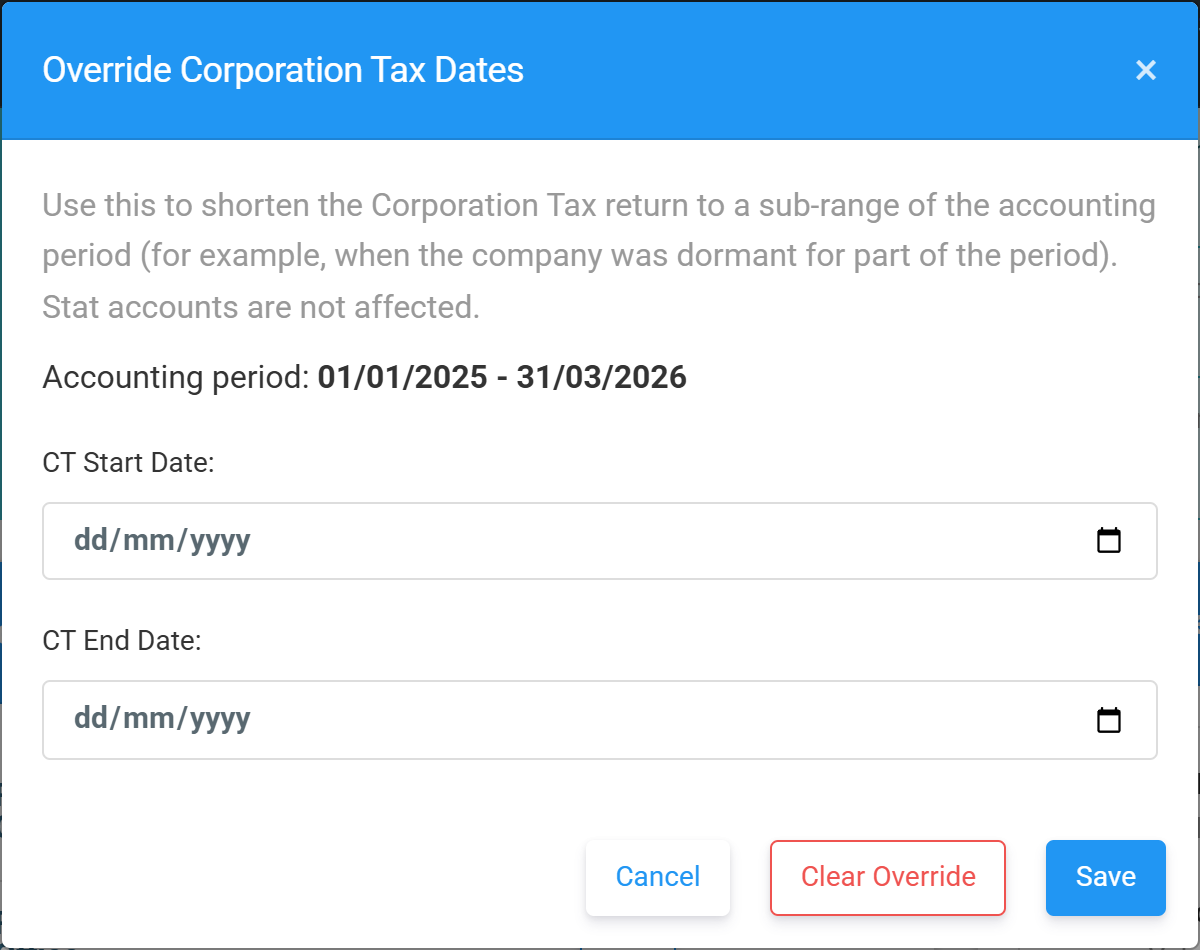
The split follows the Corporation Tax dates, not the accounts dates. If the override brings the Corporation Tax period down to 12 months or less, one return is filed even though the accounts are longer. If you change the dates after starting a submission, any return not yet sent is re-split to match.
For a first period, the overview may also suggest a Comparative period. A new company has no previous figures, so click Exclude to leave the comparative column out of the accounts.
How the figures are divided between the two returns
The accounts give one set of figures for the whole period. HMRC needs them divided between the two returns, and the method depends on the kind of figure:
| Figure | How it is divided |
|---|---|
| Trading profit or loss, turnover (box 145) | Time-apportioned by days. The tax-adjusted profit for the whole period is split in proportion to the days in each return. |
| UK property business income and costs | Time-apportioned by days. |
| Capital allowances | Worked out separately for each return. An addition belongs to the return its date falls in, and each return has its own pools and its own Annual Investment Allowance. |
| Non-trade loan relationship credits and debits, non-trade income, donations, car lease rentals | Entered per return: the grids gain a second column dated to the end of Period 2. |
| Chargeable gains | Each disposal goes into the return its disposal date falls in. |
| Small profits and marginal relief limits | Reduced for a short return. The £50,000 and £250,000 limits are scaled by the days in the return, and associated companies are counted for each return separately. |
Time-apportioning the trading profit is what HMRC expects when the accounts are not split into the two periods. Each return’s share is rounded to the nearest pound.
Capital allowances in each return
On Assets, the AIA Allocation tab has one row for each return. Each row shows the allowance available for that return’s dates, pro-rated from the £1,000,000 annual limit. A three-month Period 2 gets £246,575, not a full year’s allowance. Allocate AIA to the return in which the expenditure was incurred.
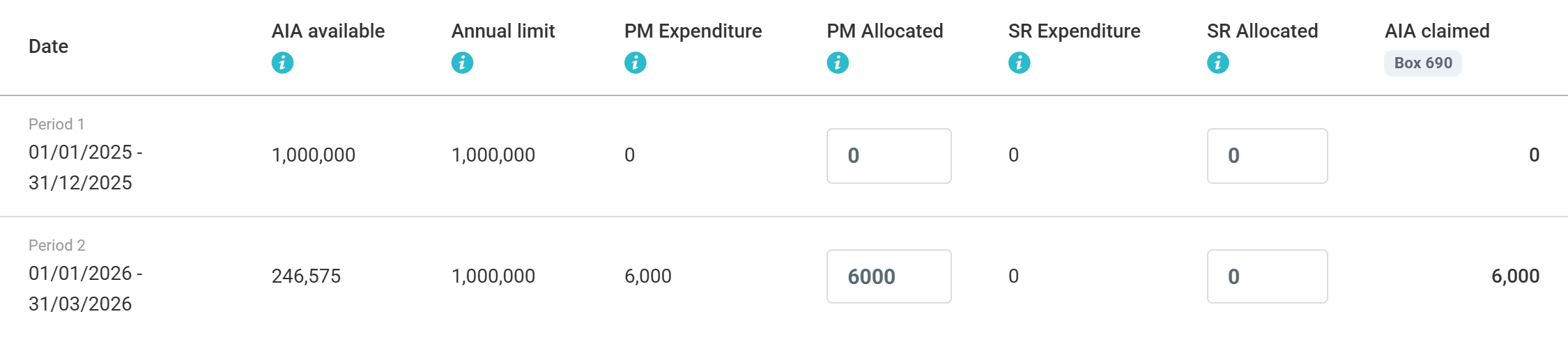
Writing-down allowances are also time-apportioned to each return’s length, so a short Period 2 gets a proportionately smaller writing-down allowance. See Capital allowances: pools, additions and the AIA for the Assets section in full.
Losses between the two returns
The two returns are separate accounting periods, so a trading loss in Period 1 is carried forward into Period 2 like a loss from any earlier year. Tax Optimiser does not use it automatically. On Losses, the Period ending … block for Period 2 has Trading Loss Brought Forward (from Period 1) (box 285 on the second return). Enter the amount you want to set against Period 2’s profits. It is capped at Period 1’s loss carried forward and at Period 2’s profit.
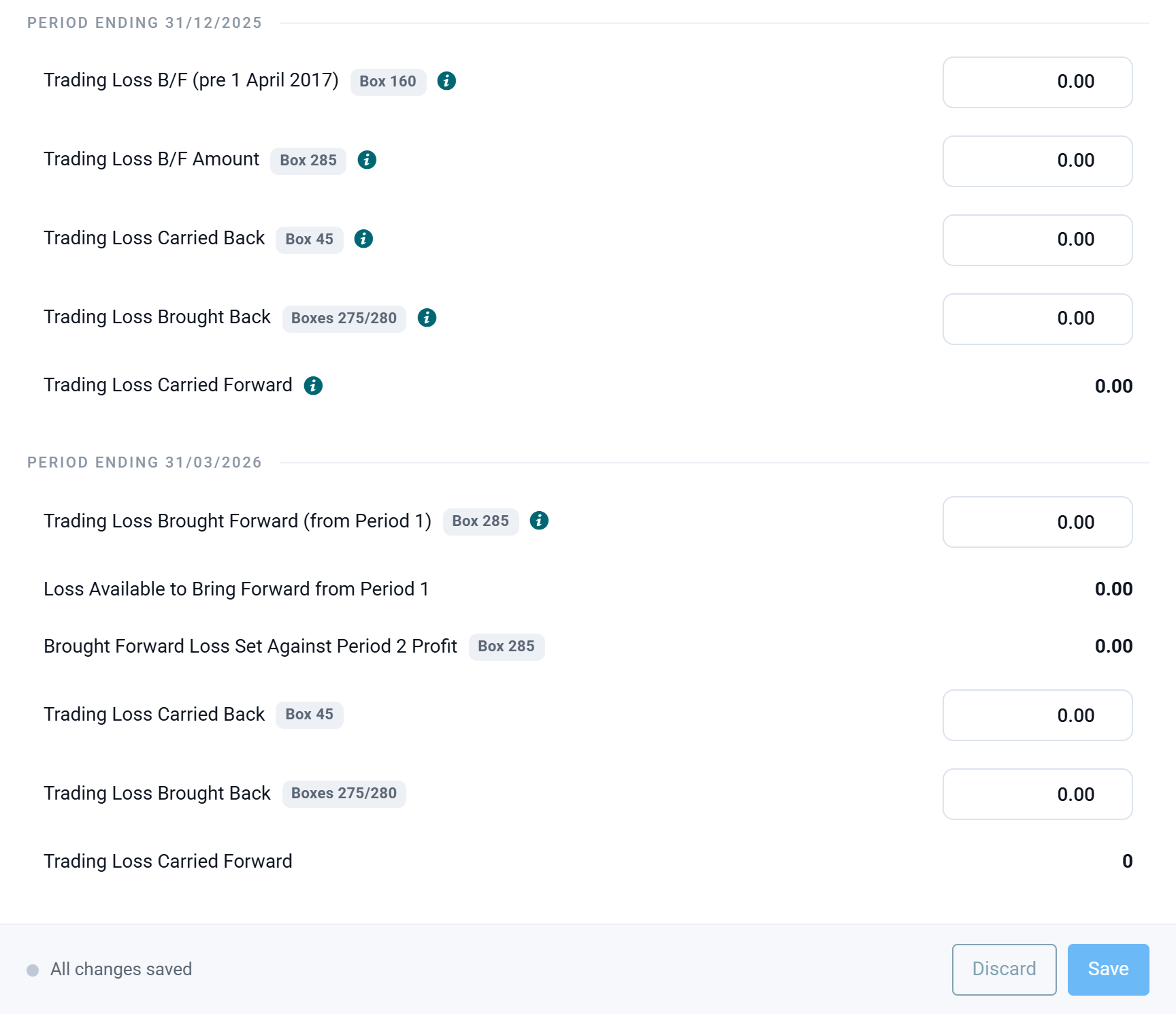
A UK property loss and a non-trading loan relationship deficit left over from Period 1 are carried into Period 2 automatically. Carrying a Period 2 loss back into Period 1 is entered by hand in each return’s fields: see Trading loss carry-back.
One set of accounts
You prepare, approve and file one set of statutory accounts for the whole period, exactly as for a 12-month year. Filing with Companies House is unchanged.
With HMRC, the accounts go with Return 1 only. Return 2 carries its own computation and tells HMRC that the accounts for this period were delivered with the other return. You don’t need to attach anything twice.
Reviewing both returns
Once the period is split, Corp Tax Calculations shows both returns side by side.
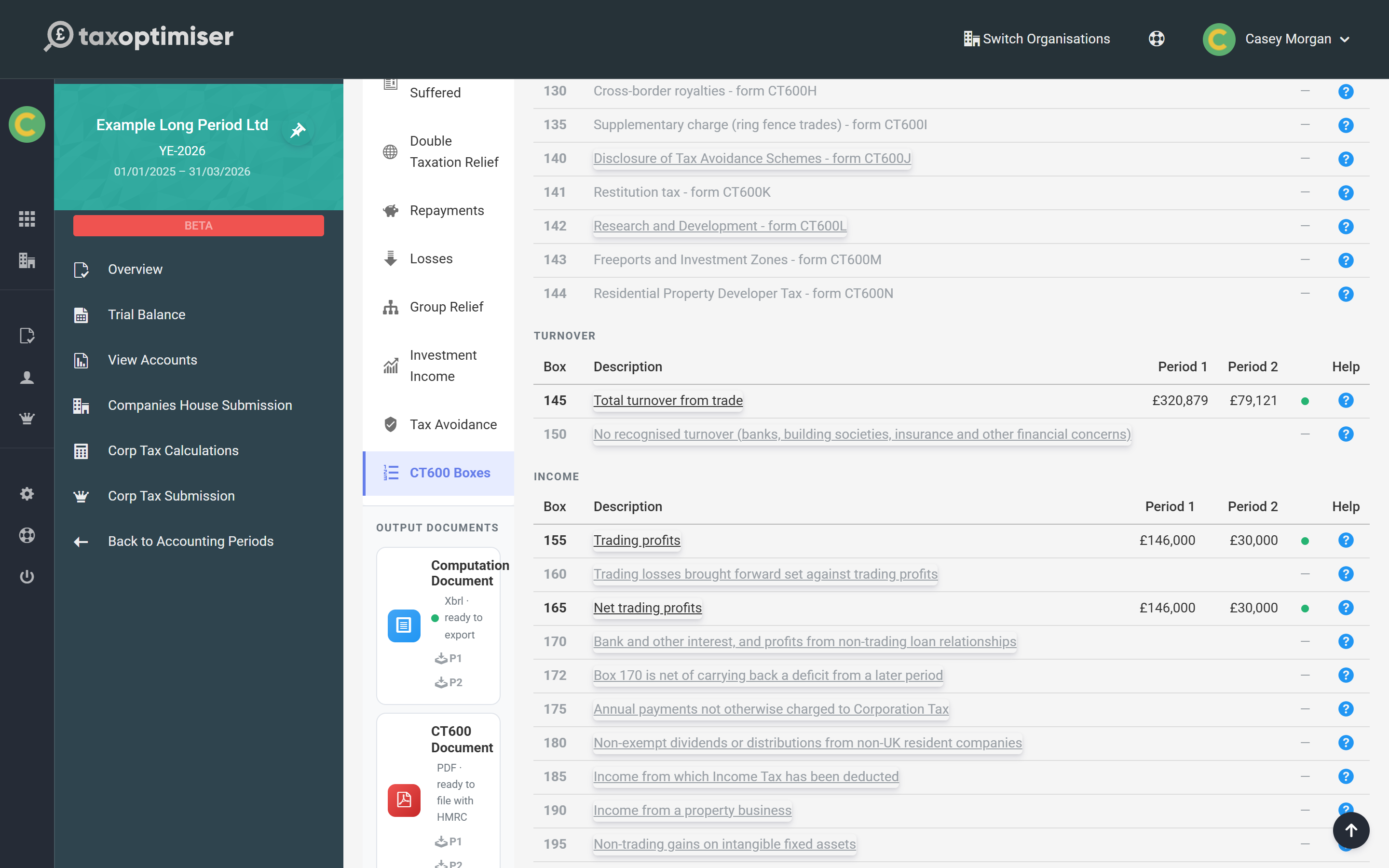
- CT600 Boxes has a Period 1 and a Period 2 column, so you can check every box of both returns in one table. The Corp Tax Payable figure at the top of the page is the total for both returns.
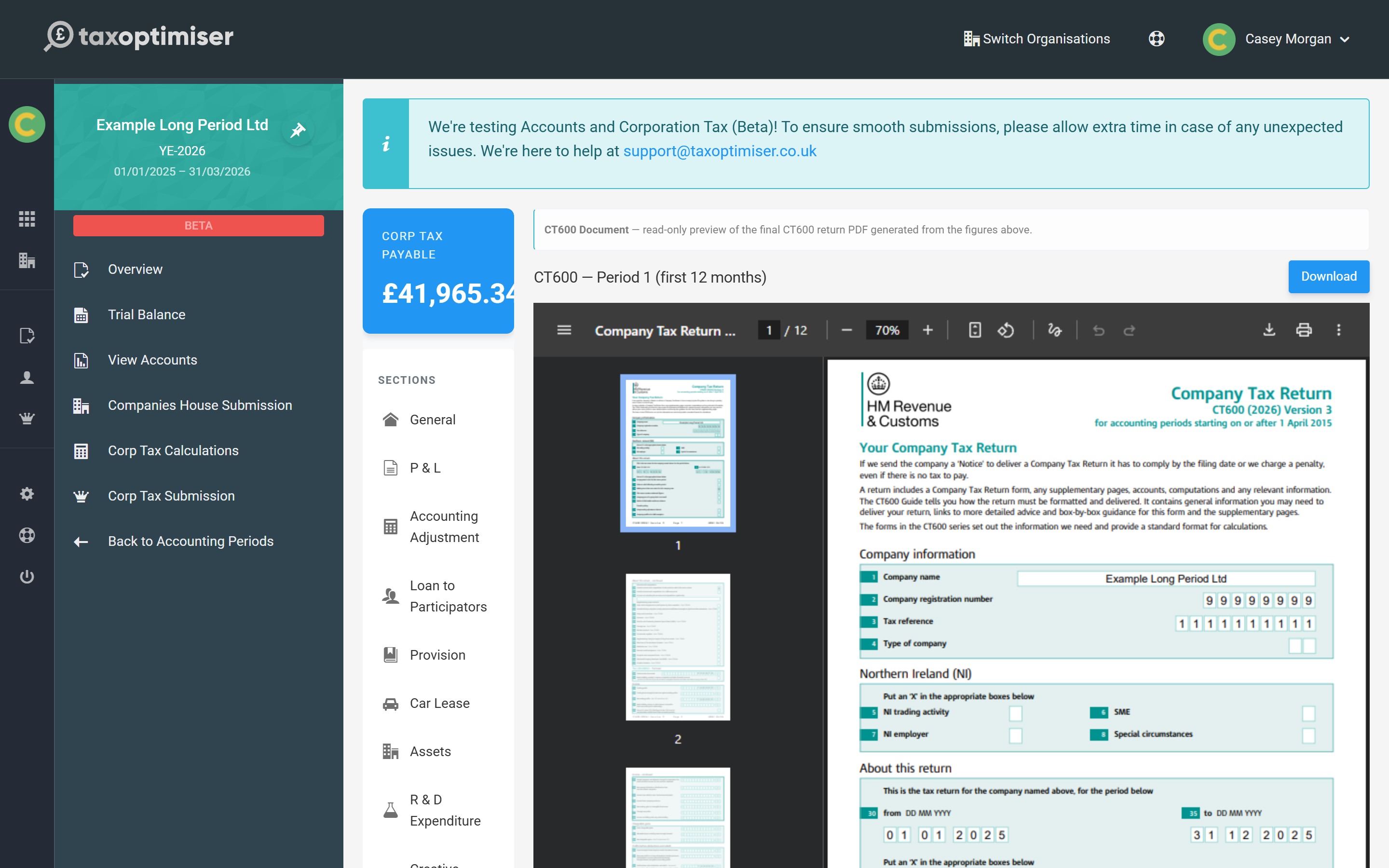
- CT600 Document shows two previews, CT600 — Period 1 (first 12 months) and CT600 — Period 2 (remainder), each with its own Download button. Supplementary pages such as CT600A are shown for each period too.
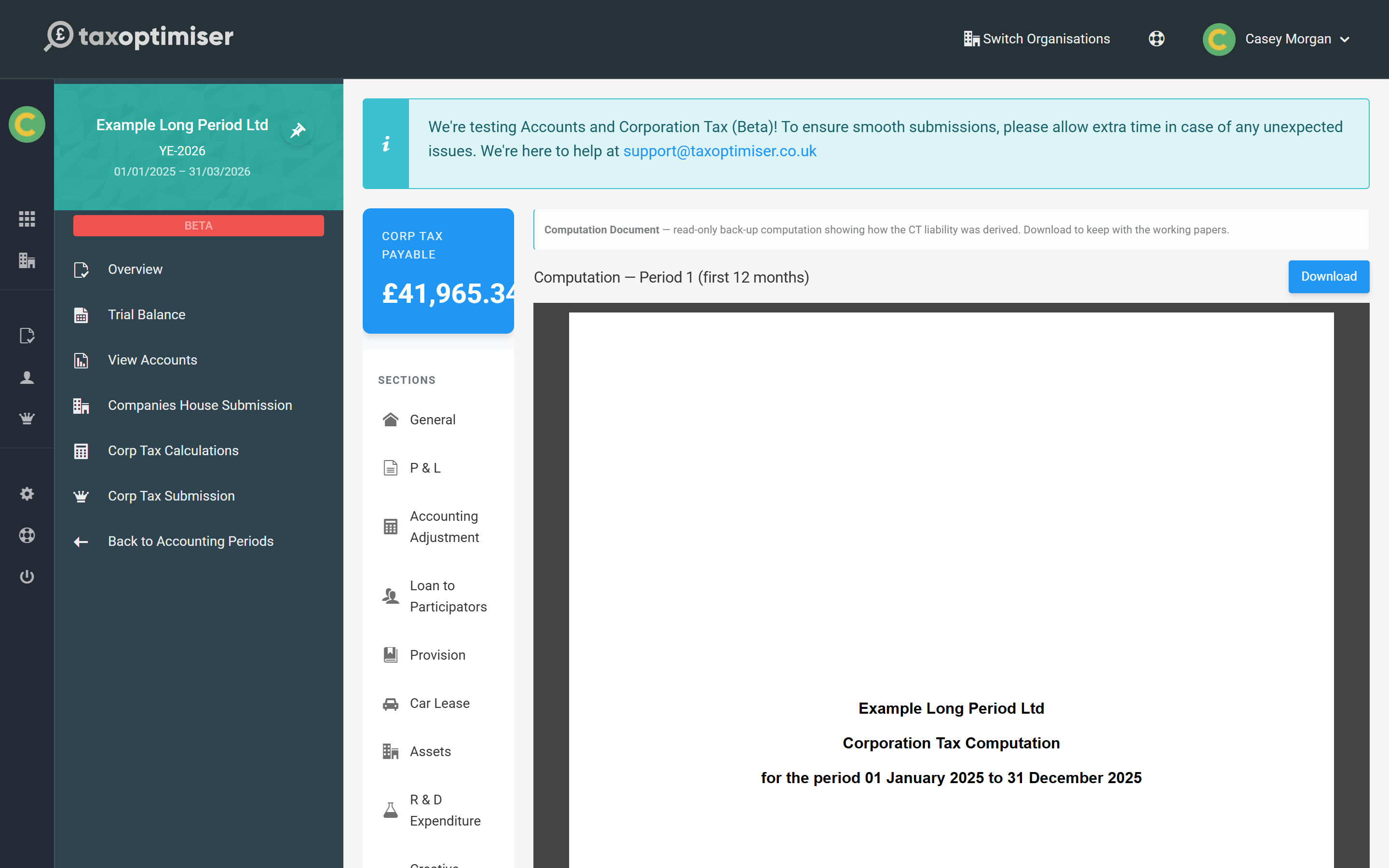
- Computation Document shows the two computations, Computation — Period 1 (first 12 months) and Computation — Period 2 (remainder). Each covers only its own return’s dates and figures, which is what HMRC receives with each CT600.
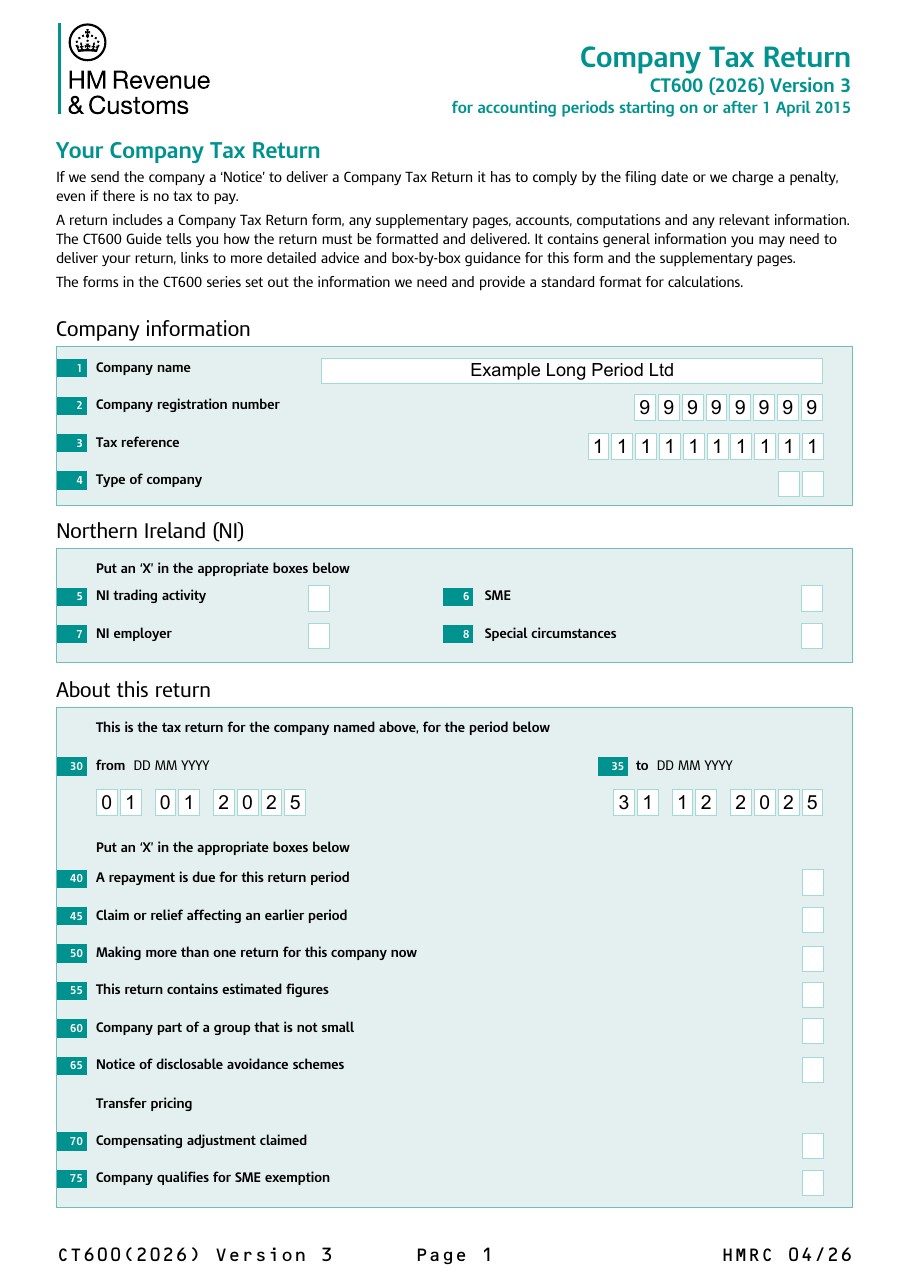
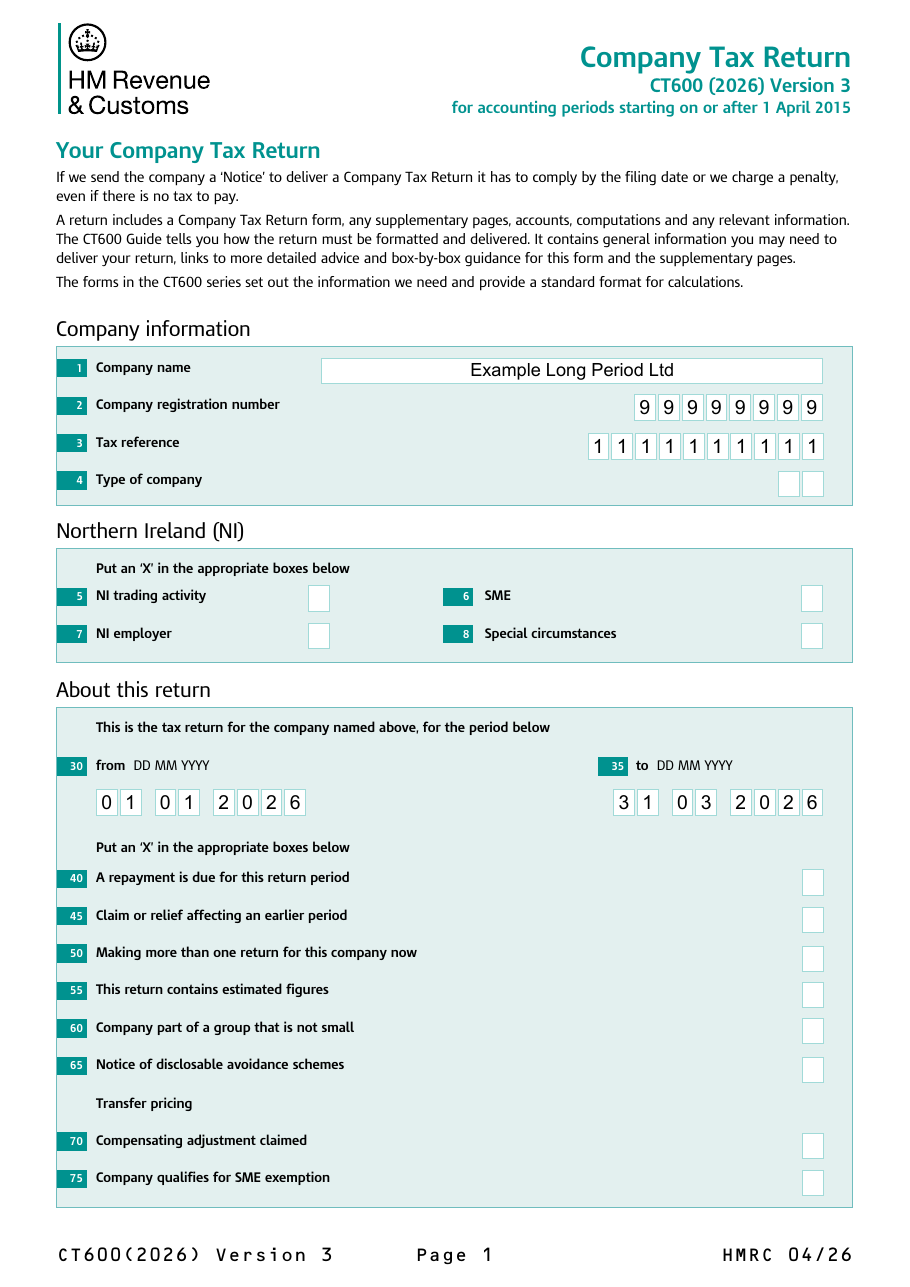
To check the dates HMRC will see, look at boxes 30 and 35 on page 1 of each CT600. Return 1 runs from 01 01 2025 to 31 12 2025, and Return 2 from 01 01 2026 to 31 03 2026:
Submitting the two returns
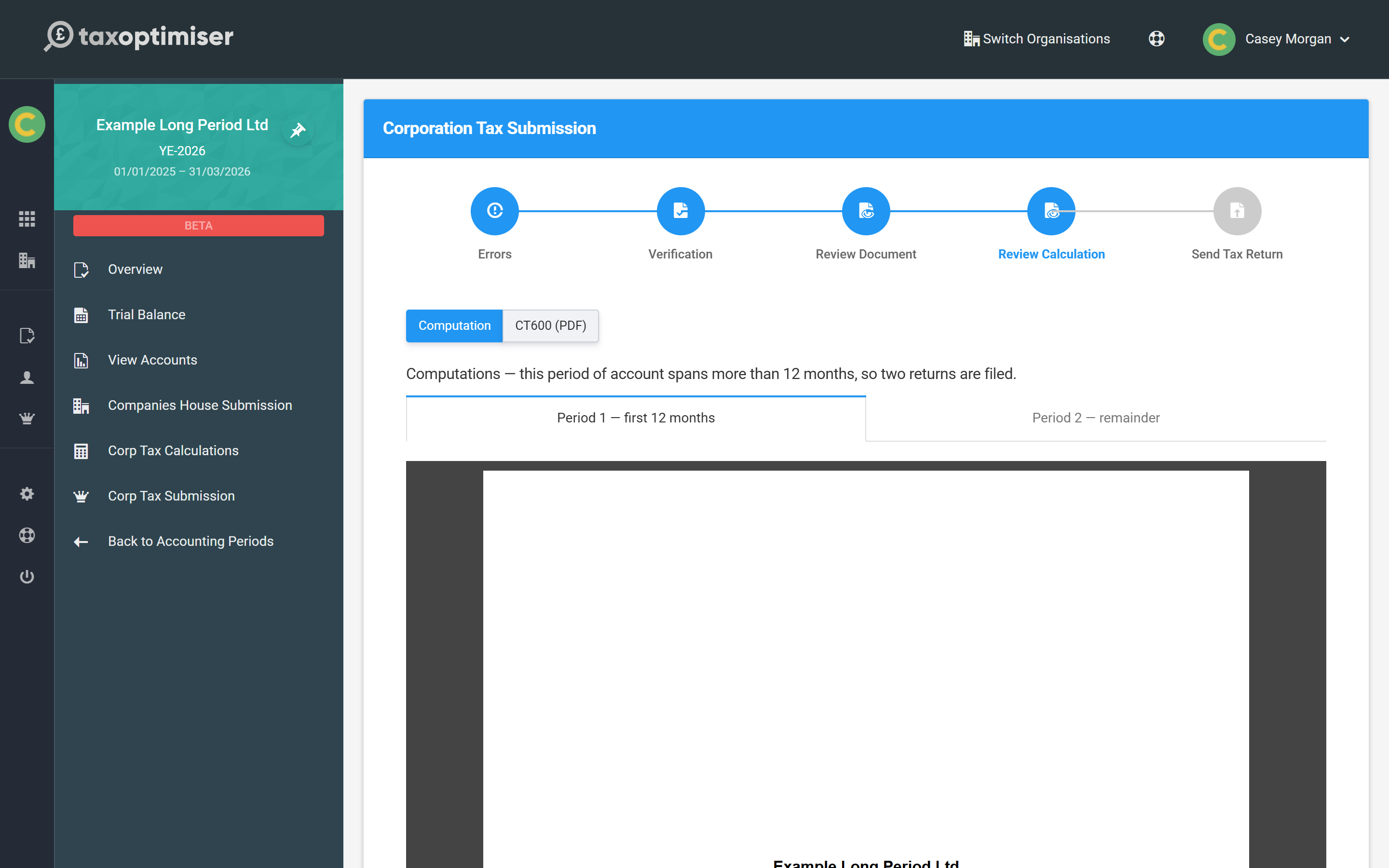
Open Corp Tax Submission as usual; there is one submission for the period. At the Review Calculation step the page explains that the period of account spans more than 12 months, so two returns are filed. It shows the computations on two tabs, Period 1 — first 12 months and Period 2 — remainder. The CT600 (PDF) button shows the two CT600s the same way. Moving on from this step confirms both computations.
One click of Submit sends both returns, in order:
- Return 1, with the accounts and the Period 1 computation, goes first.
- When HMRC accepts it, the progress message reads First submission complete, ready to send second, and Return 2 is sent with the Period 2 computation.
If Return 2 is rejected, Return 1 stays accepted. Correct the problem and submit again. Because HMRC already holds Return 1, it is re-sent as an amended return, followed by Return 2. The general steps are in Submitting your Corporation Tax return.
Payment and filing dates
- Paying the tax — each return has its own payment date, 9 months and 1 day after that return’s end. In the example, Return 1’s tax is due on 1 October 2026 and Return 2’s on 1 January 2027. Each computation shows its own “Payment Due” date.
- Filing the returns — for a period of account of up to 18 months, both returns are due 12 months after the end of the period of account: 31 March 2027 in the example. Tax Optimiser files them together, so they meet the same deadline.
- Filing the accounts — Companies House deadlines work differently for first accounts. See Companies House filing deadlines.
Because the payment date for Return 1 comes before the filing date, the first payment is often due before the return is filed. Leave time to prepare the accounts.
A worked example
Example Long Period Ltd was incorporated on 1 January 2025 and chose 31 March as its year end, so its first accounts cover 15 months (455 days). It made an accounting profit of £182,000 with no disallowable items, and bought a £6,000 packing machine on 10 February 2026.
| Return 1 01/01/2025 – 31/12/2025 | Return 2 01/01/2026 – 31/03/2026 | |
|---|---|---|
| Days | 365 | 90 |
| Adjusted profit, split by days (£182,000 × days ÷ 455) | £146,000 | £36,000 |
| Annual Investment Allowance (box 690) | — | £6,000 |
| Trading profits (box 155) | £146,000 | £30,000 |
| Upper limit for marginal relief | £250,000 | £61,643.84 (£250,000 × 90 ÷ 365) |
| Corporation Tax at 25% (box 430) | £36,500.00 | £7,500.00 |
| Marginal relief (box 435) | £1,560.00 | £474.66 |
| Corporation Tax chargeable (box 440) | £34,940.00 | £7,025.34 |
Tax Optimiser shows £41,965.34 payable for the period: the two returns added together.
Two things in this example are easy to miss:
- The machine only affects Return 2. It was bought in the last three months, so its AIA is claimed in Return 2 against that return’s reduced limit. Return 1 is not changed.
- Return 2’s limits are reduced. £30,000 of profit in a full year would be under the £50,000 small profits limit and taxed at 19%, which is £5,700. In a 90-day return the lower limit is only £12,328.77, so the profit falls into the marginal relief band and the tax is £7,025.34. Splitting a long period is not neutral.
Frequently asked questions
Why do I have two CT600s for one set of accounts?
A Corporation Tax accounting period can never be longer than 12 months. When the accounts cover more than a year, HMRC needs one return for the first 12 months and another for the rest. Tax Optimiser builds both from the same period.
Do I need to prepare two sets of accounts?
No. One set of statutory accounts covers the whole period. It is filed with Companies House once and delivered to HMRC with the first return. The second return tells HMRC that the accounts are with the other return.
Can I file one return for a period longer than 12 months?
Not if the company was within the charge to Corporation Tax for the whole period. If it was dormant at the start, set the CT Dates override to the date it came within the charge. If that brings the Corporation Tax period to 12 months or less, one return is filed.
How is the profit split between the two returns?
The tax-adjusted trading profit (and turnover and property income) is time-apportioned by the days in each return. Capital allowances are worked out for each return. Chargeable gains go to the return the disposal falls in. Non-trade items are entered per return.
What if my period of account is 18 months?
It is split the same way: 12 months, then 6 months. Both returns are due 12 months after the end of the period of account, and each has its own payment date.
Why does my Period 1 loss not reduce Period 2’s profit?
A loss is not carried forward automatically. Enter the amount to use in Trading Loss Brought Forward (from Period 1) in the Period 2 block of the Losses section; it goes in box 285 of the second return.
Why is there less Annual Investment Allowance in my second return?
The £1,000,000 AIA is an annual limit, so it is pro-rated for each return’s length. A three-month second return gets about a quarter of it, and each return has its own allowance.
Do I submit the two returns separately?
No. One submission and one click of Submit sends Return 1 and then, once HMRC accepts it, Return 2.
Where to go next
- Working through the computation — the calculation screens section by section.
- CT600 box-by-box guide — every box on the return, from the period covered onwards.
- Losses — trading, property and non-trade losses in full.