
MTD for Income Tax, with Excel bridging
Whether you're a sole trader or have a property business, send your MTD for Income Tax quarterly updates from the spreadsheet you already use, submit your final declaration, view payments and check any liabilities.
Sign up freeFree for your first year. Then £30 + VAT a year. No card required.

Self-employment and property income, sent to HMRC every quarter.
Built for sole traders, landlords and accountants
One tool for your quarterly updates and final declaration, whichever kind of income you have.

Sole traders
Keep your books in the spreadsheet you already use. Map your income and expense cells once, then upload the file each quarter and send.
See how it works →
Landlords
Send quarterly updates for your property business, then check your payments and any liabilities in the same place.
Read the MTD for Income Tax guide →
Accountants and bookkeepers
File for all your clients from one place, from £5 + VAT a month for up to ten individuals. White-label it with your firm's branding and web address.
See accountant pricing →From spreadsheet to submitted update in four steps

Configure the sheet and cells
Tell us which sheet and cells to collect the data from. Do it once and every later upload uses the same setup.

Select the MTD obligation
Pick the quarterly period you're reporting on in the software.

Upload the Excel file
Upload your spreadsheet and the figures are read from the cells you configured.

Send the MTD ITSA return
Check the figures and send the update to HMRC.
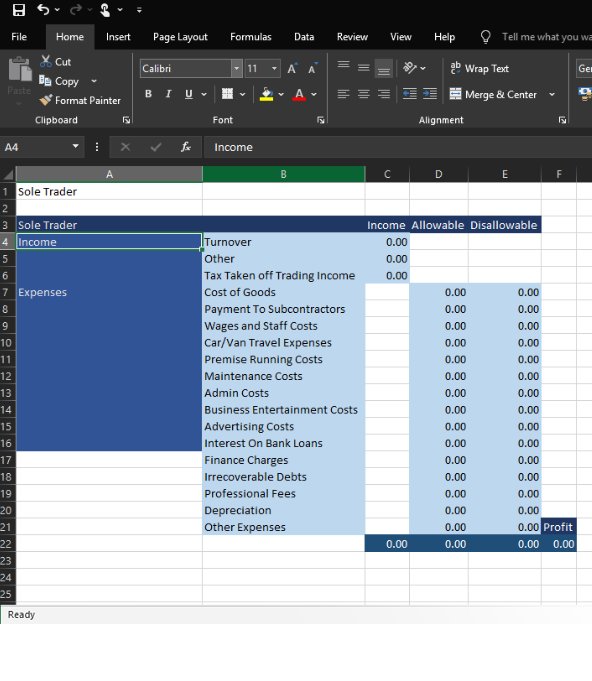
A sole trader spreadsheet, ready to upload.
Keep your spreadsheet, stay compliant
If you are using a bespoke system, or software that does not support MTD, our Excel import will solve your problem. Your income and expenses stay in the file you know, and Tax Optimiser sends the totals to HMRC.
Read the MTD for Income Tax guide →See where you stand with HMRC
As well as submitting your MTD for Income Tax returns, you can view your payments and check any liabilities from the same place.

What our customers say
I recently used Tax Optimiser for the first time to submit my accounts to Companies House and HMRC, and I’m thoroughly impressed. The platform is remarkably easy to manage, walking you through the entire process without any complex jargon. On top of that, their prices are extremely competitive. It saved me a ton of time and stress—I will definitely be using them again next year.

I had next to no confidence that Tax Optimiser could handle accounts submission and Corporation Tax. But I gave it a whirl… Both Companies House and HMRC have initially accepted the submissions… I previously filed on professional software and I paid about £1500. This is dirt cheap.

Excellent software. Very affordable if you're doing your own small company accounts. Links with Xero… Tax Optimiser has been a complete life saver for me.

Simple, honest pricing
Free for your first year as an individual. Accountants pay a small monthly fee that scales with clients.
Individuals
Free for the first year
Pricing is for the ITSA module only. Sign up for free today
Then £30 + VAT a year per individual
No credit card required
Accountants
We also offer the option to white label Tax Optimiser with your firms branding and custom website address
Basic 10 tier
Pricing is for the MTD ITSA module only. for up to 10 individuals
Basic 50 tier
Pricing is for the MTD ITSA module only. for up to 50 individuals
Corporation Tax and Accounts Production
£10 + VAT per organisation for both the corporation tax and end of year accounts submissions

New to MTD for Income Tax?
Our guide explains what Making Tax Digital for Income Tax is and how quarterly updates and the final declaration work.
Frequently asked questions
More from Tax Optimiser


Your spreadsheet. Your quarterly updates. Free for a year.
Sign up free, configure your cells once, and send your next update in minutes.
Sign up free