
File your SA100 Self Assessment tax return for £10 + VAT
The whole return and its supplementary pages, with the tax worked out as you go. When you are happy with it, you submit it straight to HMRC yourself. For individuals filing their own return and accountants filing for clients. No subscription.
Tell me when it launches Create a free account£10 + VAT per return, paid when you submit. First tax year: 2025-26.
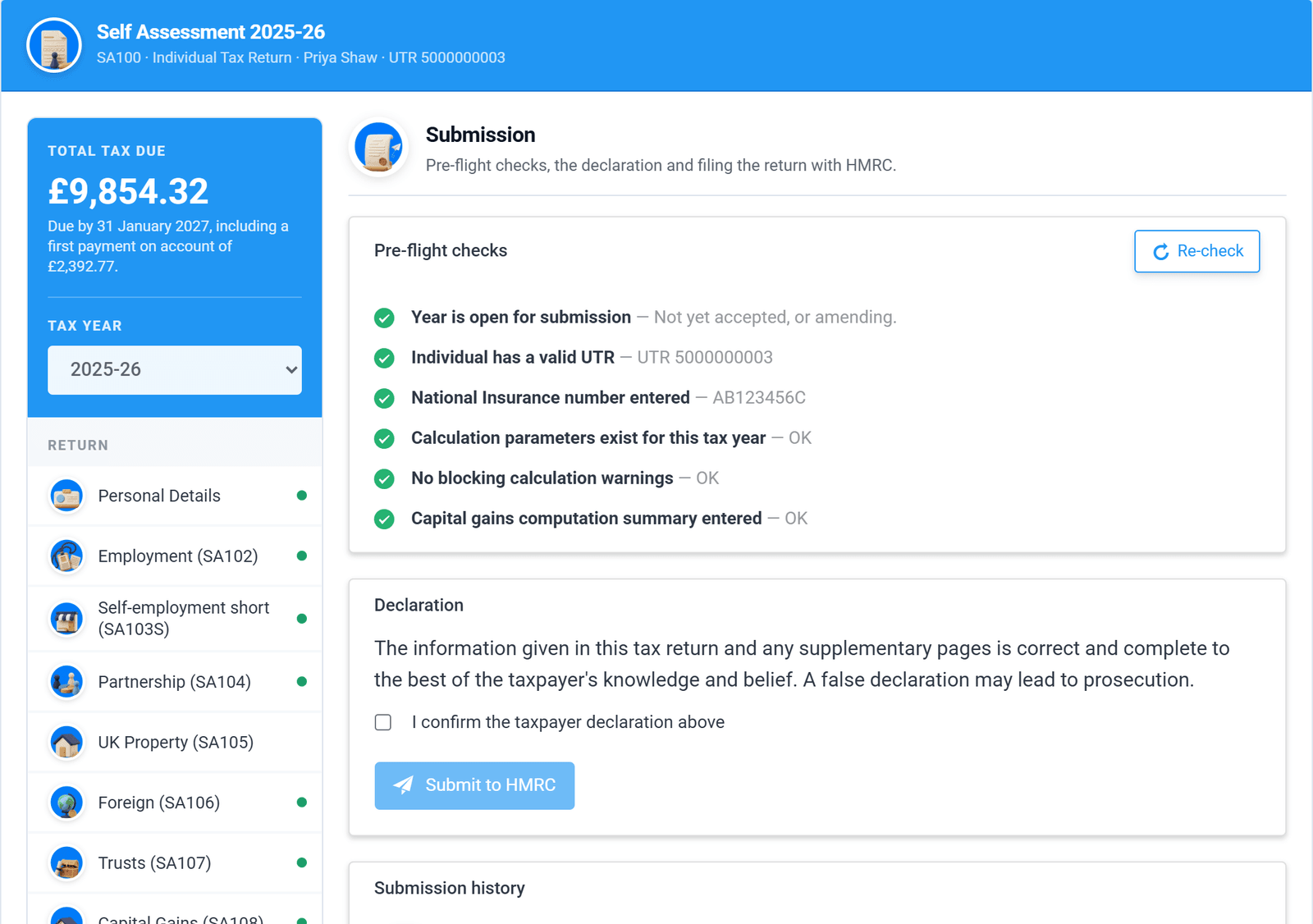
The submission screen: tax due, pre-flight checks and the declaration. Real screen, demo data.
SA100 filing with Tax Optimiser, at a glance
- What it does
- Tax Optimiser is software you use to prepare the SA100 Self Assessment tax return, see the tax calculated, and submit the return online to HMRC yourself.
- Who files
- You do. The taxpayer, or their accountant acting as agent, checks the return, makes the declaration and submits it under their own Government Gateway login. Tax Optimiser does not prepare or file returns on your behalf.
- Status
- Coming soon. SA100 filing is in closed beta with accountancy firms and is not yet open to the public.
- Price
- £10 + VAT (£12 including VAT) per return, paid when you submit. There is no subscription. Accountants pay one credit per return, from £3 + VAT with credit packs.
- Who it is for
- Sole traders, landlords, company directors, partners and other individuals filing their own return, and accountants and bookkeepers filing for clients.
- First tax year
- 2025-26, the year from 6 April 2025 to 5 April 2026. HMRC's deadline for filing that return online is 31 January 2027.
- Pages covered
- The SA100 and supplementary pages SA101, SA102, SA103S, SA103F, SA104S, SA104F, SA105, SA106, SA107, SA108 and SA109, with the SA110 tax calculation summary.
- Useful when
- You lived abroad as a non-resident or have income from a trust. HMRC says its own online service cannot be used in those cases, so you need commercial software or a paper return.
Built for the people who file Self Assessment
One return, whatever mix of income it has to report.

Sole traders
Short or full self-employment pages, capital allowances, losses, and Class 2 and Class 4 National Insurance worked out for you.

Landlords
UK and overseas property, the property allowance, rent-a-room relief and the finance cost tax reducer.

Directors and partners
Salary, dividends and benefits for directors. Partners enter their share from the SA800 partnership return.

Accountants
Every individual client in one account, filed as an agent and paid for with the credits you already use for CT600.
From blank return to filed in four steps

Pick the pages you need
Tick the kinds of income the return has. Only those pages appear, each named with its HMRC form number.

Enter the figures
Boxes are grouped the way the paper form is and carry HMRC's box references, so a P60 or a set of accounts maps straight across.

Check the calculation
See the tax due, band by band, with payments on account, before anything is sent. Download it as a PDF.

Submit to HMRC
Pre-flight checks point at anything missing. Pay £10 + VAT, submit, and keep HMRC's response on file.
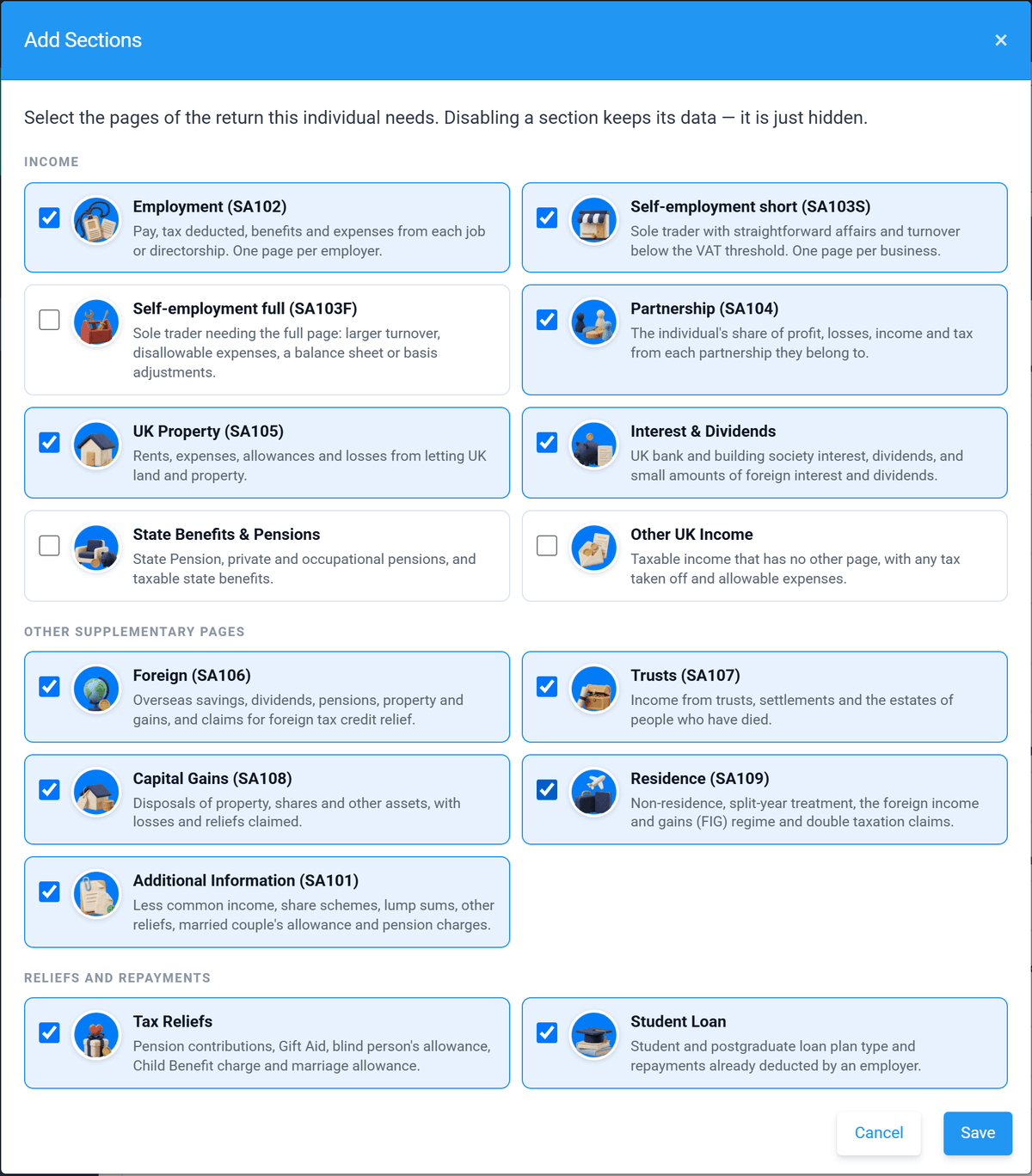
Choose the supplementary pages by name and form number.
Only the pages this return needs
Employment, self-employment, partnership, property, foreign income, trusts, capital gains and residence are each a tick box. Turn a page off and its figures are kept, not lost.
See every page covered →HMRC's own boxes, in a layout you can read
Every field shows its HMRC box reference, and a running total of tax due stays on screen while you type. Groups without figures fold away so a simple return stays simple.
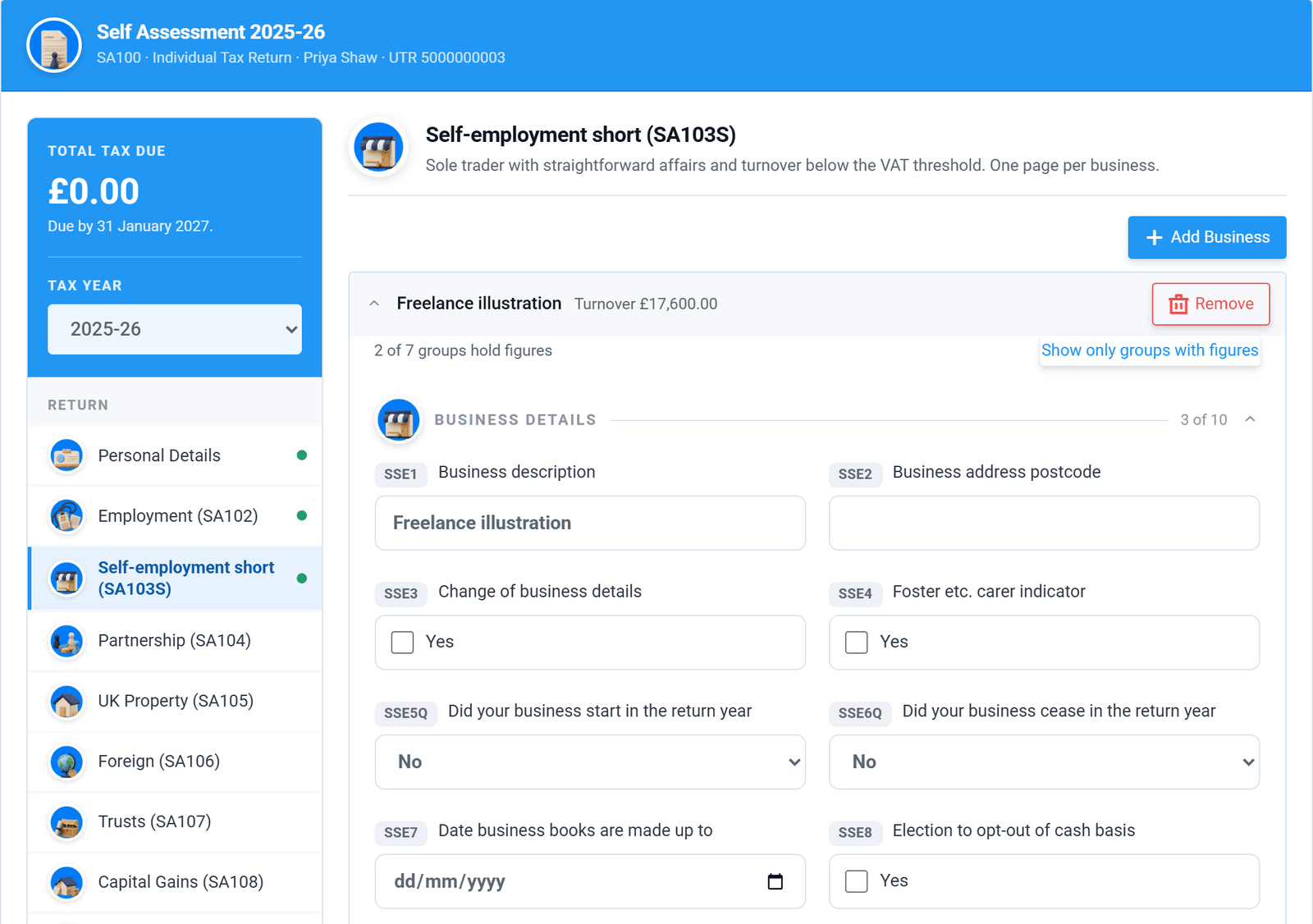
The short self-employment page, with HMRC's box references.
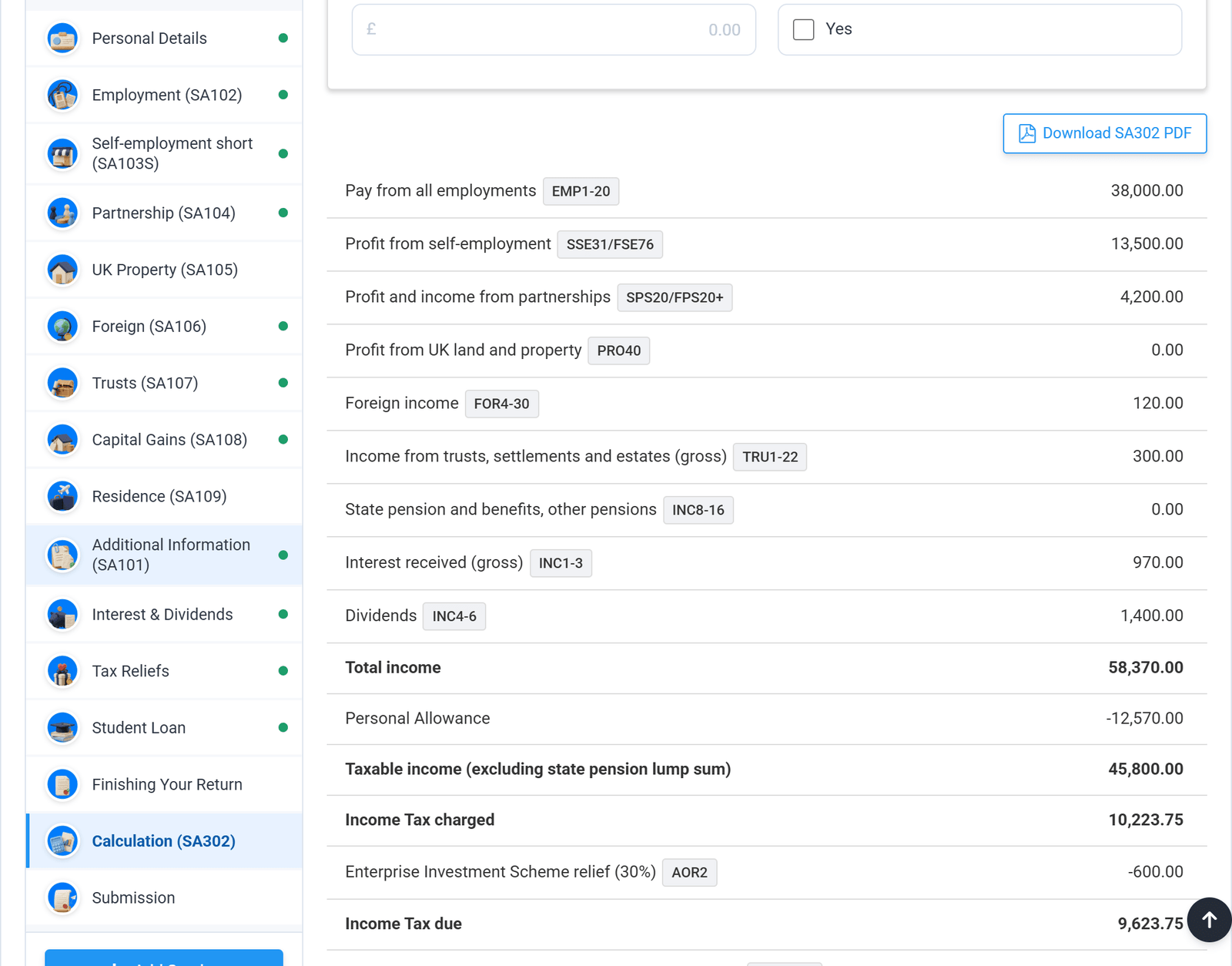
The calculation, line by line, with the boxes each figure came from.
See exactly where the tax bill comes from
The calculation follows the layout of HMRC's SA302. Each line names the boxes behind it, so a figure that looks wrong takes seconds to trace. Download it as a PDF for a mortgage lender or your own records.
Band by band, with payments on account
Non-savings, savings, dividends and gains are each shown at the rate they were taxed. The balancing payment and both payments on account are set out with their due dates.
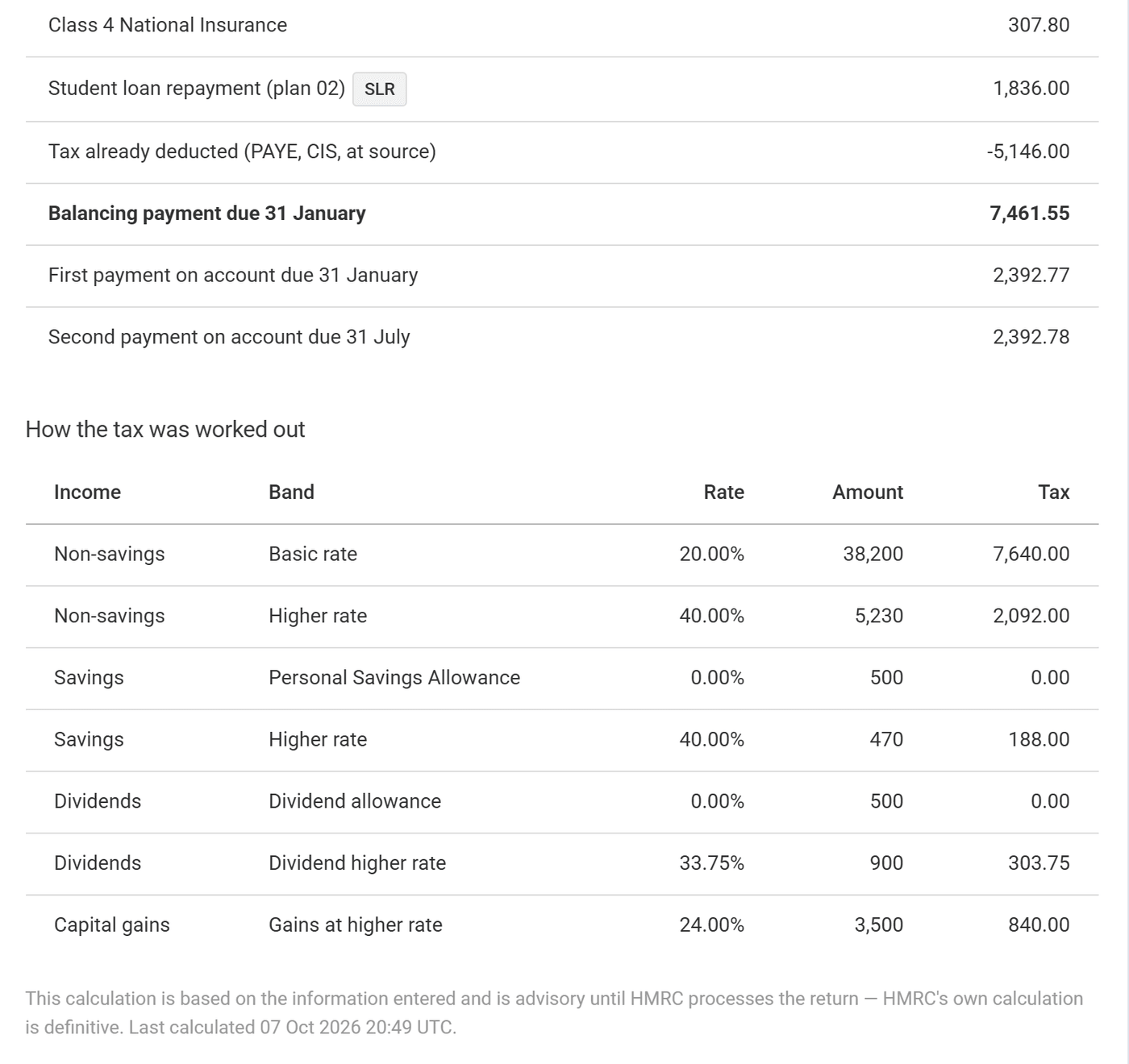
How the tax was worked out, and when it is due.
Exactly what the SA100 covers
Check your return is in scope before it launches. Everything listed here can be completed and calculated in the app, and submitted to HMRC by you.

Income pages
SA102 — employment, one page per job or directorship
SA103S / SA103F — self-employment, short and full
SA104S / SA104F — partnership, short and full
SA105 — UK property
SA100 — interest, dividends, pensions, state benefits and other UK income

Other supplementary pages
SA106 — foreign income and foreign tax credit relief
SA107 — trusts, settlements and estates
SA108 — capital gains
SA109 — residence and split-year treatment
SA101 — additional information
Filing
Pre-flight checks that link to the box to fix
PDF attachments sent with the return
Submission history with HMRC's response
Amended returns
SA302-style calculation as a PDF

The calculation
Income Tax by band, including Scottish rates
Class 2 and Class 4 National Insurance
Student and postgraduate loan repayments
High Income Child Benefit Charge
Capital gains tax, including Business Asset Disposal Relief
Pension contributions, Gift Aid and Marriage Allowance
Payments on account, and claims to reduce them
SA110 tax calculation summary, filed with the return

Not supported yet
- Foreign income and gains (FIG) regime claims
- Remittance basis and unremittable income
- Overseas Workday Relief and the Temporary Repatriation Facility
- Top-slicing relief on life insurance gains
- Non-resident capital gains tax disposals
- Pension savings tax charges
- Lloyd's underwriters (SA103L) and ministers of religion (SA102M)
Not sure about your return? Ask us →
What our customers say
I recently used Tax Optimiser for the first time to submit my accounts to Companies House and HMRC, and I’m thoroughly impressed. The platform is remarkably easy to manage, walking you through the entire process without any complex jargon. On top of that, their prices are extremely competitive. It saved me a ton of time and stress—I will definitely be using them again next year.

I had next to no confidence that Tax Optimiser could handle accounts submission and Corporation Tax. But I gave it a whirl… Both Companies House and HMRC have initially accepted the submissions… I previously filed on professional software and I paid about £1500. This is dirt cheap.

Excellent software. Very affordable if you're doing your own small company accounts. Links with Xero… Tax Optimiser has been a complete life saver for me.

Simple, honest pricing
The same price as our CT600 filing: £10 + VAT a return, or one credit if you are an accountant.
Pay-as-you-go
per individual, per tax year. Free to prepare, paid when you submit. No subscription.
SA100 and every supported supplementary page
Tax calculation and SA302-style PDF
PDF attachments
Direct submission to HMRC
Email support
For accountants and bookkeepers
One credit = one SA100 return, or one company's accounts and CT600. All prices + VAT.
| Pack | Credits | Price | £ per credit |
|---|---|---|---|
| Pay-as-you-go | 1 | £10 | £10 |
| Starter | 25 | £200 | £8 |
| Practice | 100 | £600 | £6 |
| Growth | 250 | £1,250 | £5 |
| Scale | 500 | £2,000 | £4 |
| EnterpriseBest value | 1,000 | £3,000 | £3 |
All prices exclude VAT. Credits do not expire.
Sign up to buy creditsBe first to file your SA100
Leave your email address and we will write to you once, on the day it opens. No newsletter, no sales calls.
We only use your address to tell you about this launch. See our privacy policy.

Want to see how it works first?
The beta guide walks through a complete return, from personal details to the accepted submission, with screenshots of every step.
SA100 questions, answered
In Making Tax Digital for Income Tax from April 2026? See MTD for Income Tax. Filing for a partnership? See the SA800 partnership return.
More from Tax Optimiser


Your SA100, filed for £10 + VAT. Coming soon.
Leave your email address and we will tell you the day it opens.
Tell me when it launches