
To file your accounts at Companies House from Tax Optimiser you need two things from Companies House: the company’s authentication code and a presenter ID with its password. This article covers the presenter ID: what it is, how to apply for one, and where to enter it. It is written for a company filing its own accounts. If an accountant firm files for you, see If your accountant files for you below.
What a presenter ID is
A presenter ID identifies the person or business sending a filing to Companies House by software. Companies House issues it with a presenter authentication code, which Tax Optimiser calls the presenter password. You apply once and use the same pair for every set of accounts you file.
Heads up — the presenter ID is not your Companies House WebFiling sign-in, and it is not the company’s six-character authentication code. You need the presenter ID and password and the authentication code to file. See Your Companies House authentication code.
How to apply for a presenter ID
The application is free and takes around five minutes. Companies House calls it a presenter account, and it is the right account if you only file accounts and other documents that have no filing fee.
- Open Apply to file with Companies House using software on GOV.UK and choose the presenter account application.
- Sign in to your Companies House account, or create one.
- Give a name and a correspondence address for the presenter account.
- Give the name or company number of the business you work for. For your own company, that is your company.
- Submit the application. Companies House then sends you the presenter ID and the presenter authentication code.
You do not need a Companies House credit account. That is only for filings that carry a fee, such as incorporations and confirmation statements.
Where to enter it in Tax Optimiser
There are three places, and they all save to the same organisation record, so use whichever you reach first.
On the Organisation page
- Click Organisation in the left-hand menu.
- Open the Companies House tab. The tab only appears for limited companies.
- Enter the presenter ID in Companies House Presenter Id.
- Enter the presenter authentication code in Companies House Presenter Password.
- Click Save.
From the accounting period
Open the accounting period. If the presenter details are missing, the Setup Process Checklist shows a Presenter Credentials line. Click Enter Credentials, type the presenter ID and password, and save.
In the Companies House submission wizard
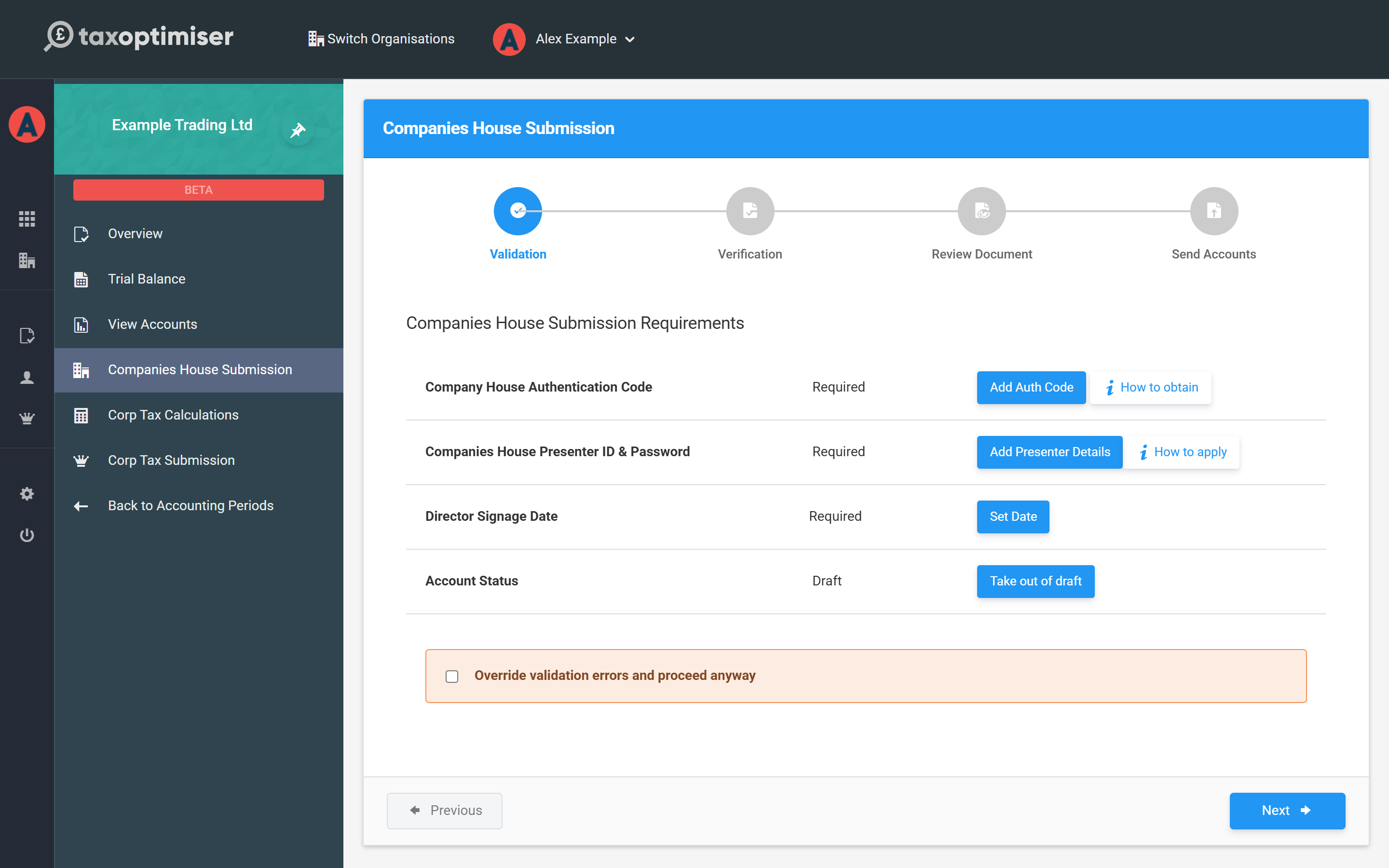
The first step of the wizard lists everything the filing needs. Next to Companies House Presenter ID & Password, click Add Presenter Details (or Update if they are already set). The How to apply link beside it opens the GOV.UK application.
How the password is stored
The presenter password is encrypted before it is saved and is never shown again once saved. The password box shows that one is saved; leave it blank to keep the saved password, or type a new one to replace it.
If your accountant files for you
When your organisation is managed by an accountant firm in Tax Optimiser, the accounts are filed with the firm’s presenter ID, and you do not need your own. The wizard shows Please contact your accountant about the presenter ID and password instead of the button. Accountants enter the firm’s details in Firm Settings: see Adding your firm’s Companies House Presenter ID.
If a filing is rejected for the presenter details
A rejection that mentions the presenter usually means the ID or password was mistyped. Check both against what Companies House sent you, enter the password again with Update, and submit again. If the rejection mentions the authentication code instead, that is the company’s six-character code, which is entered separately.
What is a Companies House presenter ID?
It identifies whoever sends a filing to Companies House by software. It comes with a presenter authentication code, and you need both to file accounts from Tax Optimiser.
Does a presenter ID cost anything?
No. A presenter account is free. It covers accounts and other filings that have no fee.
Is the presenter ID the same as the company authentication code?
No. The authentication code is a six-character code that belongs to the company. The presenter ID belongs to whoever sends the filing. Filing accounts needs both.
Can I use one presenter ID for more than one company?
Yes. The presenter ID identifies you as the presenter, not the company. Enter the same presenter ID and password on each organisation, with each company’s own authentication code.
Do I need a presenter ID to file only a CT600?
No. The presenter ID is only for filing accounts at Companies House. The CT600 goes to HMRC with your Government Gateway user ID and password.