
Sending your VAT return tells HMRC how much you owe. It doesn’t pay it. Tax Optimiser never takes or passes on your VAT: you pay HMRC directly, either by a Direct Debit that collects each bill for you or by making the payment yourself. This article covers when the money is due, how to set up a Direct Debit, the other ways to pay, and how to check HMRC has received it.
The short version: set up a Direct Debit in your HMRC VAT online account and each bill is collected automatically after you send the return. Otherwise, pay online at gov.uk/pay-vat using your 9-digit VAT registration number as the reference.
When the payment is due
The payment deadline is the same as the deadline for the return: usually one calendar month and seven days after the end of the VAT period. A quarter ending 31 March is due by 7 May.
The money has to have reached HMRC’s bank account by that date, not just left yours. That still applies when the deadline falls on a weekend or bank holiday, so allow for the time your payment method takes. HMRC’s VAT payment deadline calculator shows the latest day to pay for each method.
In Tax Optimiser, each period on VAT → VAT Returns shows its due date, and the dashboard VAT card shows the next one.
The dates are different if you use the Annual Accounting Scheme or make VAT payments on account.
How much to pay
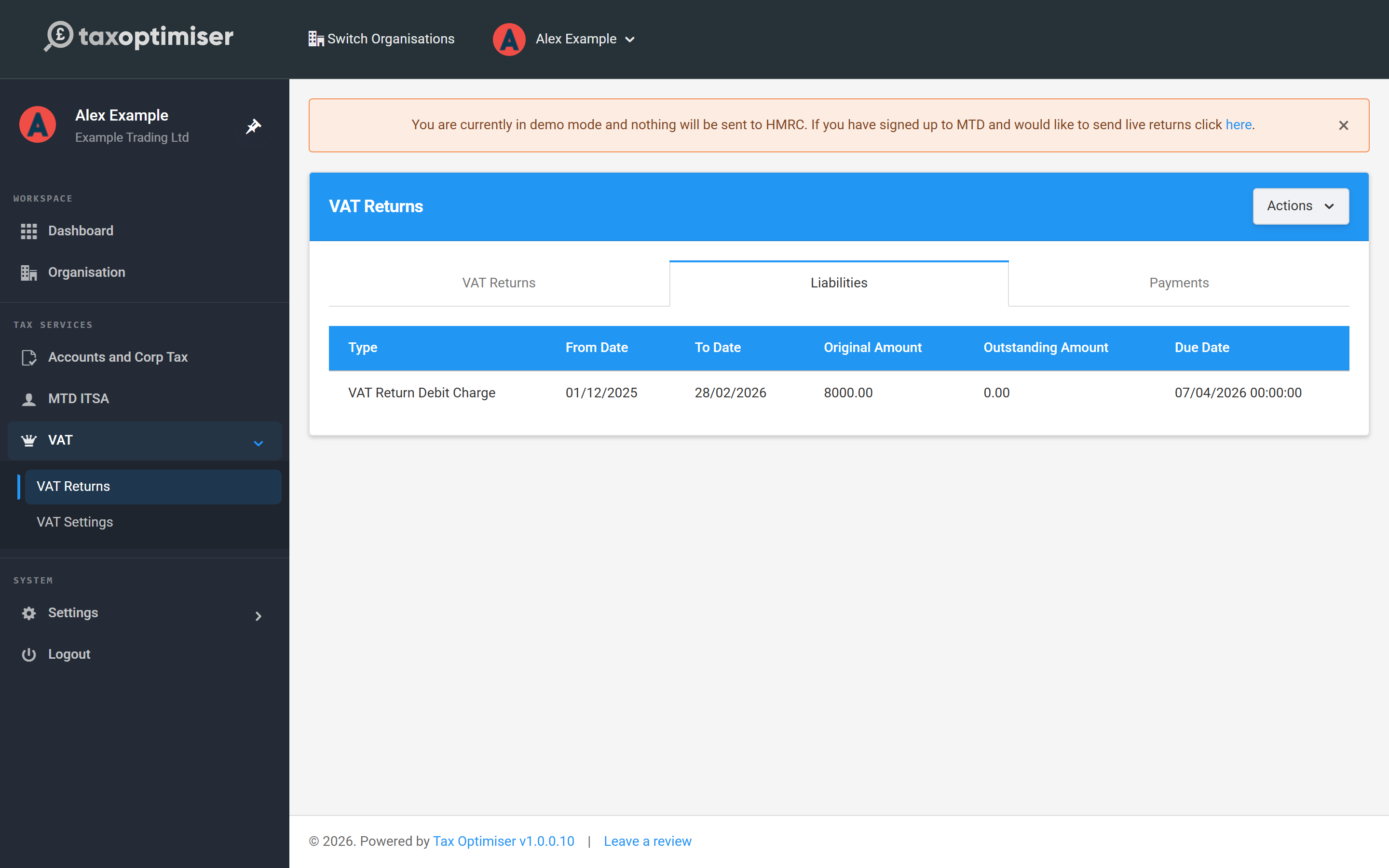
The amount is box 5 of the return you sent (net VAT to pay to HMRC). After the return has been accepted, the Liabilities tab on the VAT Returns screen shows the charge HMRC has raised, its due date and the Outstanding Amount still to pay.
If box 4 is bigger than box 3, HMRC owes you. See If HMRC owes you money below.
Your payment reference
Every payment needs your 9-digit VAT registration number as the reference, typed without spaces. You will find it on your VAT registration certificate and in your HMRC VAT online account.
With the wrong reference, a payment can be delayed or set against a different tax bill. If that happens, HMRC’s VAT general enquiries team can move it.
A surcharge or penalty is paid with a different reference: the 14-character number starting with X on the letter HMRC sent you about it.
Set up a Direct Debit
A Direct Debit is the simplest way to pay. Once it is in place, HMRC collects each VAT bill from your bank account after you send the return, so there is nothing to remember and no reference to type.
- Go to Pay your VAT bill by Direct Debit on GOV.UK and click Set up a Direct Debit.
- Sign in to your HMRC VAT online account with the business’s Government Gateway user ID and password.
- Enter the details of the UK bank account the VAT should be collected from, then confirm.
- Send your return from Tax Optimiser as usual. HMRC works out the amount from the return.
The timing rules
- Set it up at least 3 working days before you send your return. If you leave it later than that, the payment for that return won’t be taken and you will need to pay it another way. The Direct Debit then applies from your next return.
- HMRC collects the money 3 working days after the payment deadline on the return. Sending the return early doesn’t bring the collection forward.
- If you send the return late, the payment is taken 3 days after you send it.
- If the Direct Debit hasn’t been used for two years or more, check with your bank that it is still set up.
When you can’t pay by Direct Debit
You must pay another way if you:
- pay from an overseas bank account
- have a VAT payments on account arrangement
- are approved to send paper VAT returns
- are an insolvency practitioner
- are paying more than £20 million
A Direct Debit also doesn’t collect a VAT surcharge or penalty. Pay those using one of the methods below.
Other ways to pay
If you don’t have a Direct Debit, start at Pay your VAT bill using another payment method on GOV.UK. Pick a method that will get the money to HMRC in time:
| Method | How long it takes |
|---|---|
| Approve a payment through your online bank account | Usually instant |
| Debit card or corporate credit card, online | Counted on the day you pay |
| Faster Payments | Same or next day, including weekends and bank holidays |
| CHAPS | Same working day, if within your bank’s processing times |
| Bacs | 3 working days |
| At your bank or building society | Counted on the day you pay, Monday to Friday (slips take up to 4 weeks to arrive) |
| Standing order | 3 working days |
Pay online through GOV.UK
Click Pay now on the GOV.UK page, enter your VAT registration number and the amount, then choose one of two options:
- Pay by bank account. You are passed to your own online or mobile banking to approve the payment. You can choose a date to pay, as long as it is before the payment is due. Check afterwards that the money left your account on the right day.
- Pay by card. HMRC accepts a personal debit card, a corporate debit card or a corporate credit card. There is a non-refundable fee for corporate cards and no fee for a personal debit card. You can’t pay with a personal credit card. The payment counts on the day you make it, even at a weekend or on a bank holiday.
Pay by bank transfer
You can pay from your online banking, banking app or branch by Faster Payments, CHAPS or Bacs, using these HMRC details:
| Sort code | 08 32 00 |
|---|---|
| Account number | 11963155 |
| Account name | HMRC VAT |
| Reference | Your 9-digit VAT registration number, no spaces |
From an overseas bank account, pay in sterling using IBAN GB36 BARC 2005 1773 1523 91, BIC BARCGB22, account name HMRC VAT. Your bank may charge you if you send any other currency.
Check before you pay. These are the details published by HMRC when this article was written. Confirm them on GOV.UK before setting up a new payee, and never use bank details sent to you in an email, text or phone call.
Pay at your bank or building society
You need HMRC paying-in slips first. Order them by emailing the Electronic Payment Team at electronicpaymentteam@hmrc.gov.uk with your VAT number. They can take up to 4 weeks to arrive, so this isn’t an option for a bill that is due soon. Pay by cash or cheque at your own branch, make the cheque payable to “HM Revenue and Customs only” and write your VAT registration number on the back.
Standing order
Standing orders are only for businesses on the Annual Accounting Scheme or making payments on account. They are set up with form VAT 622 or through your bank, using the bank transfer details above.
Check HMRC has received your payment
Your HMRC VAT online account shows what you owe and what has been paid. Tax Optimiser reads the same information from HMRC:
- Go to VAT → VAT Returns and click Refresh from HMRC.
- Open the Payments tab to see each payment HMRC has matched to your VAT account and the date it was received.
- Open the Liabilities tab. When the Outstanding Amount for the period is zero, that bill is settled.
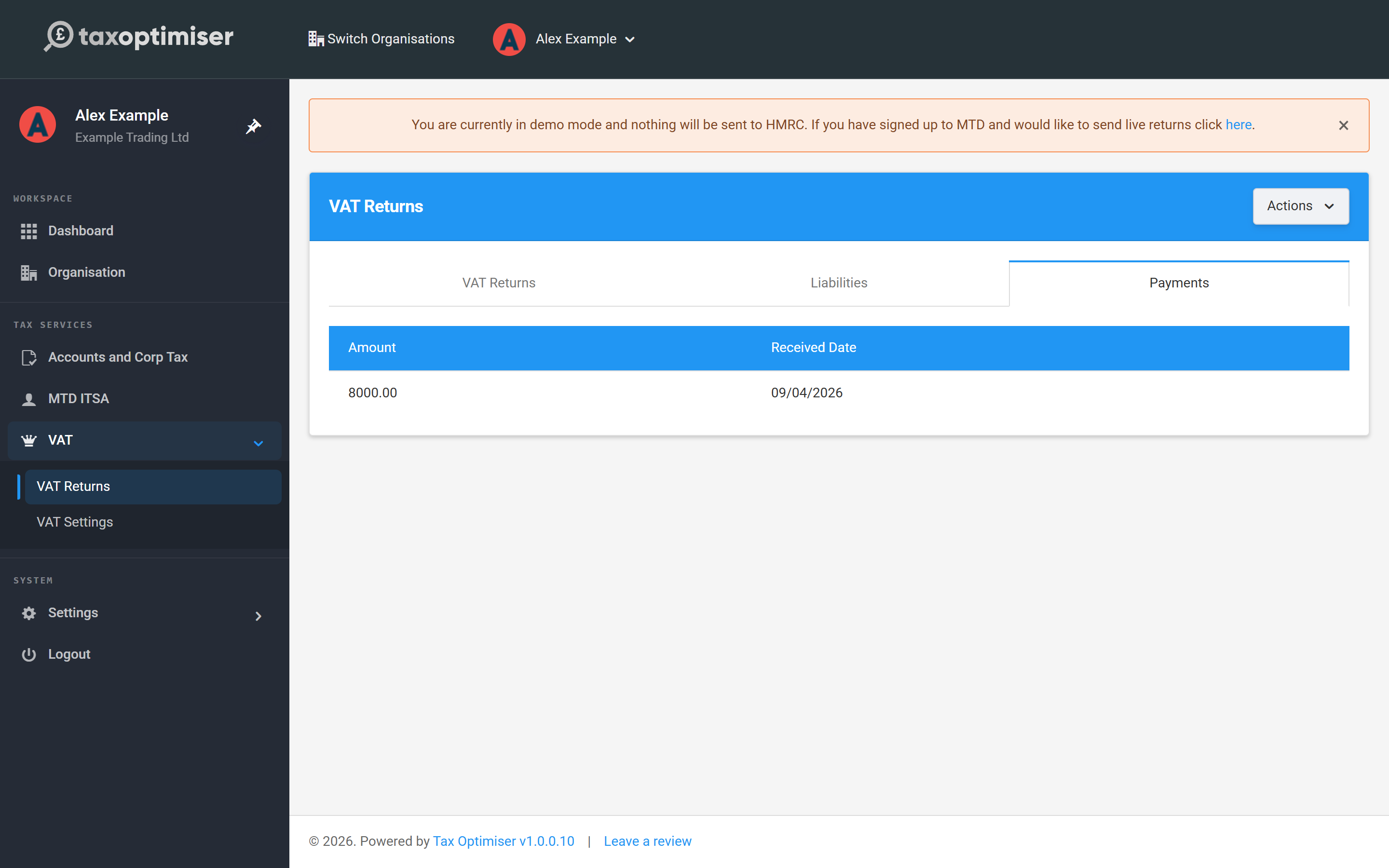
HMRC can take a few days to show a payment against your account, so don’t worry if it isn’t there the same day. If the money has left your bank and still hasn’t appeared, check the reference you used and then contact HMRC. There is more on these two tabs in Liabilities, payments and the quarterly cycle.
If you pay late or can’t pay
For VAT periods starting on or after 1 January 2023, paying late has two costs:
- Late payment interest, charged from the first day the payment is overdue until it is paid in full.
- A late payment penalty, which depends on how late you pay. It goes up after 16 days and again after 31 days. See how late payment penalties work.
Sending the return late is penalised separately, through penalty points, so send the return on time even when you can’t pay on time.
If you can’t pay in full, contact HMRC as soon as possible, ideally before the deadline. You may be able to set up a payment plan and pay in monthly instalments by Direct Debit. Interest still runs while you pay. See If you cannot pay your tax bill on time.
If HMRC owes you money
When a return shows a repayment, there is nothing to pay. HMRC doesn’t use your Direct Debit details for repayments. It pays into the bank account held in the registration details of your VAT online account, and sends a cheque if there isn’t one. Add or update the account there if you want repayments to go straight to your bank.
Frequently asked questions
Does sending my VAT return pay the VAT?
No. The return only tells HMRC the amount. The VAT is paid when your Direct Debit is collected or when you make the payment yourself.
Can I pay my VAT through Tax Optimiser?
No. Tax Optimiser sends the return and shows what HMRC says you owe and have paid, but the money always goes straight from you to HMRC.
I set up a Direct Debit after sending my return. Will it be collected?
No. The Direct Debit has to be in place at least 3 working days before the return is sent. Pay this bill another way, for example online at gov.uk/pay-vat. The Direct Debit will collect your next one.
When does a Direct Debit take the money?
Three working days after the payment deadline on the return. For a quarter ending 31 March, with a deadline of 7 May, that is a few days after 7 May.
What reference do I use?
Your 9-digit VAT registration number with no spaces. For a surcharge or penalty, use the 14-character reference starting with X from HMRC’s letter.
Can I pay by credit card?
Only with a corporate credit card, and there is a fee. HMRC doesn’t accept personal credit cards.
Why isn’t my payment on the Payments tab?
The tab shows what HMRC has matched to your VAT account, which can take a few days. Click Refresh from HMRC to fetch the latest position. If it still isn’t there, check the reference and contact HMRC.
My return was nil. Do I need to do anything?
There is nothing to pay, but the return still has to be sent by the deadline.
Related: Send your return and keep the receipt.
