
When a company earns interest — on its bank deposit, on a loan it has made, on loan notes it holds — Corporation Tax does not treat that interest as part of the trade. It is a non-trading loan relationship credit, and it is taxed on its own line of the Company Tax Return, box 170, after being netted against any non-trade interest the company pays. In Tax Optimiser those credits go in the Non Trade Credit section of the Corp Tax workspace. This guide explains what counts, when Tax Optimiser picks interest up for you and when it does not, how to fill in the grid, and every box it affects.
What a loan relationship credit is
A company has a loan relationship whenever it is owed money — or owes it — under a debt that arises from lending money. Cash in a bank account is a loan to the bank; a loan to another company is one; so are corporate bonds and loan notes. The credits are the income and gains on those debts:
- interest received or receivable, including on bank and building society deposits;
- discounts and premiums on loan notes and bonds;
- profits on selling or redeeming loan notes and bonds;
- exchange gains on money owed to the company in a foreign currency.
A credit is non-trading unless lending money is itself the company’s trade. For a bank or a finance company, interest is trading income; for every other company — a shop, a builder, a consultancy — it is non-trading, however closely the deposit is tied to the business. That is why almost every company with a bank account that pays interest has a box 170 figure.
What is not a loan relationship credit: dividends received (usually exempt and not reported at all), rent (box 190), trade debts owed by customers (part of the trade), and one-off sundry income (box 205, in the Non Trade Income section).
Is it picked up automatically?
This depends on the type of accounts, and it is the most common cause of box 170 going wrong:
- FRS 102 and FRS 102 Section 1A accounts. Interest the trial balance holds in the “Other interest receivable and similar income” group — “Bank interest receivable”, for instance — is picked up for you. It is taken out of the trade and put into the loan relationship figure automatically, and the computation’s accounts adjustments page lists it as “Bank, building society or other interest and profit and gains from non-trading loan relationships”. Do not enter it in the grid as well. If you do, it is counted twice: taken out of the trading profit twice and added to box 170 twice.
- FRS 105 (micro-entity) accounts. The micro-entity format has no separate interest line, so the same nominal accounts sit in “Other income” — and stay in the trading profit. Enter every interest item in the grid.
- Any accounts: interest posted somewhere else (to sales, to sundry income, or to a nominal account of your own) is not picked up. Enter it in the grid.
The quick check: open the computation and look at the accounts adjustments page. If the “Bank, building society or other interest” line is there, that interest is already dealt with.
Enter credits in Tax Optimiser
Open the accounting period’s Corp Tax workspace and choose Non Trade Credit in the left-hand menu.
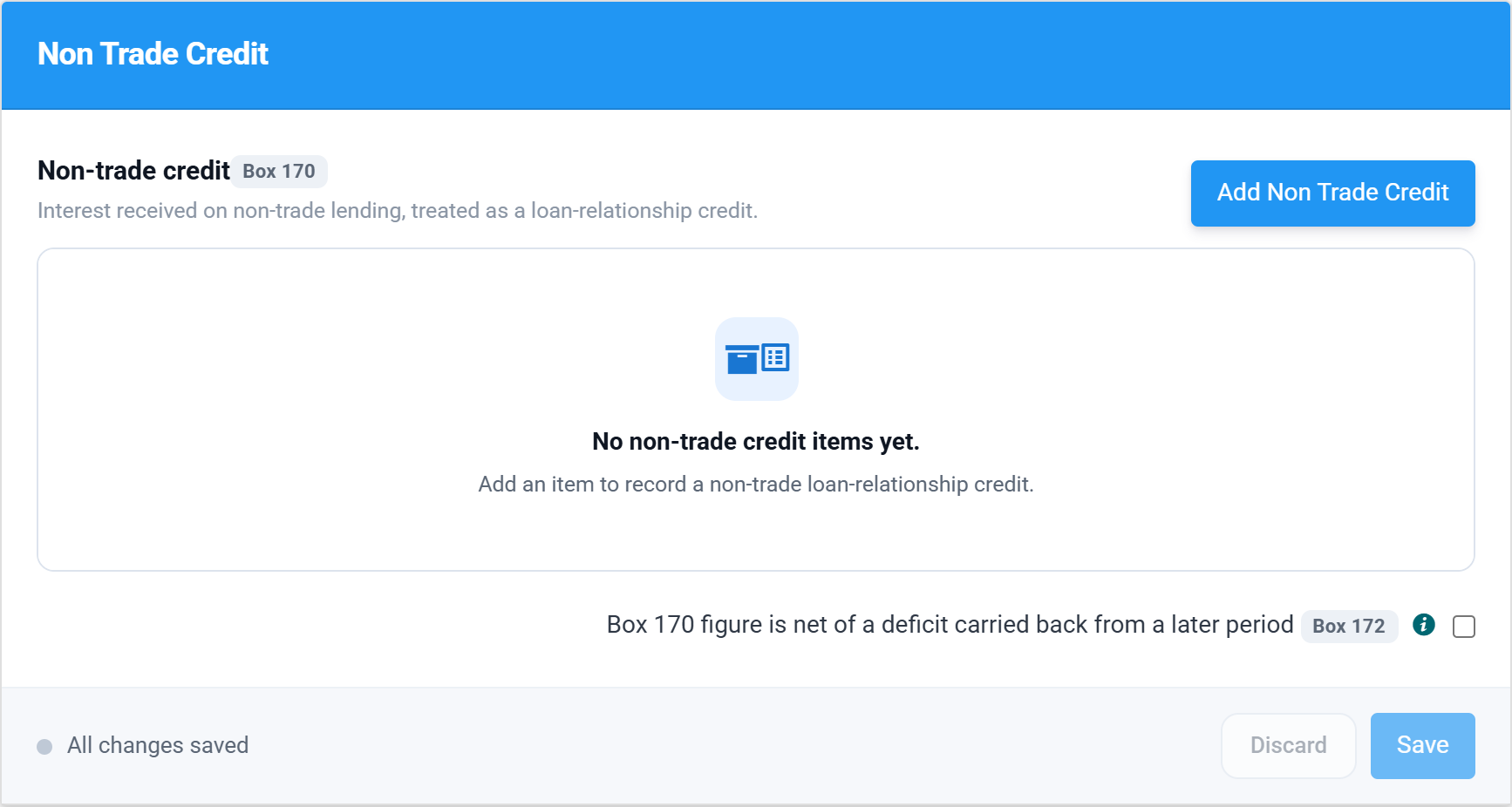
Choose Add Non Trade Credit for each source of interest — one row per bank account or loan is the easiest to review.
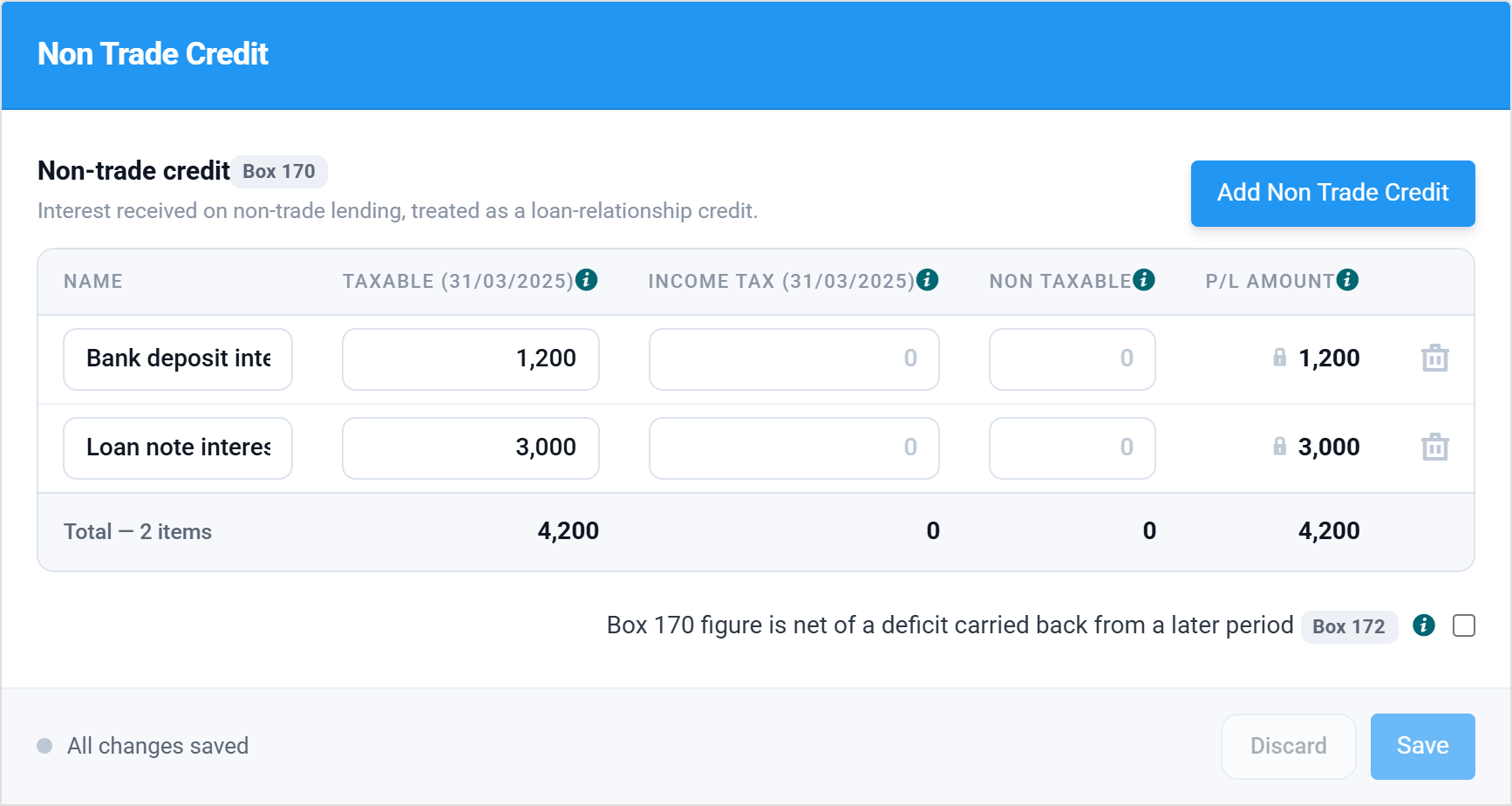
| Column | What goes in it | Box |
|---|---|---|
| Name | The bank account, loan or security. It prints on the computation. | — |
| Taxable | The credit taxable in this period — normally the gross interest in the accounts, before any tax deducted. A period of account longer than 12 months shows a Taxable column for each return. | 170 |
| Income Tax | UK income tax the payer deducted before paying you. Most interest is now paid gross, so this is usually blank. | 515 |
| Non Taxable | Any part of the amount in the profit and loss account that is not a taxable credit. | — |
| P/L Amount | Calculated: Taxable + Non Taxable. The amount taken out of the trading profit. | — |
For ordinary interest, the taxable amount is the amount in the accounts: tax follows the accounts for loan relationships. Enter it in Taxable, leave the other two blank, and choose Save.
Because the P/L Amount is always Taxable plus Non Taxable, the grid assumes the credit is in the profit and loss account. If an item is in the accounts only partly, or not at all, the P/L Amount will not match the accounts — check the accounts adjustments page afterwards.
What it does to the computation
Two things happen when you save:
- The P/L Amount leaves the trade. It is deducted from the profit per accounts as “Non-trade loan relationship credits”, under non-taxable income.
- The Taxable amount joins the loan relationship result. It is added to any interest picked up automatically, and the allowable non-trade debits are taken off.
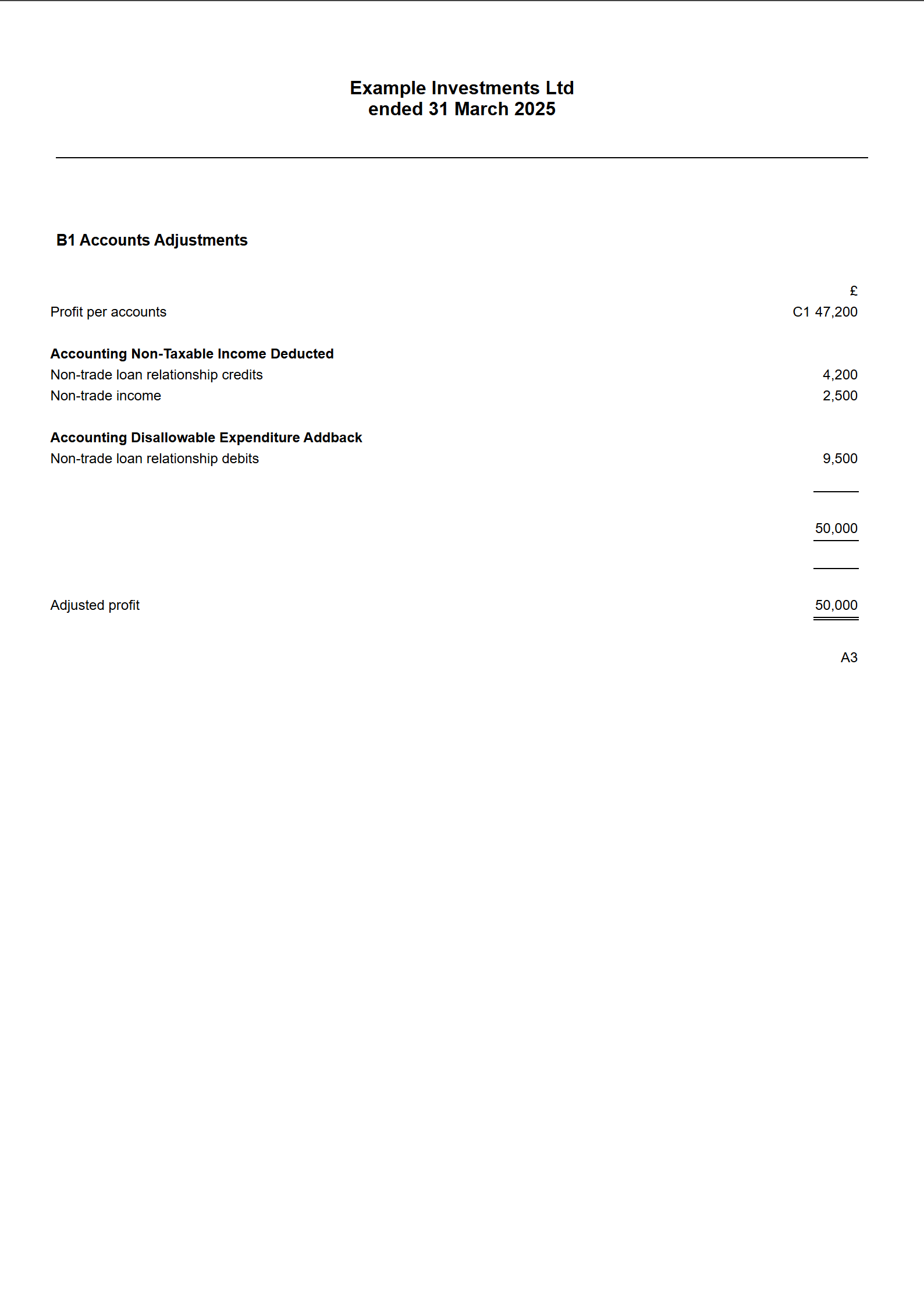
The result of the netting decides the box:
- Credits more than debits — the surplus is taxable income in box 170.
- Debits more than credits — box 170 is nil and the difference is a non-trading deficit, reported in box 795 and relieved in box 260. The Non Trade Debit guide covers deficits.
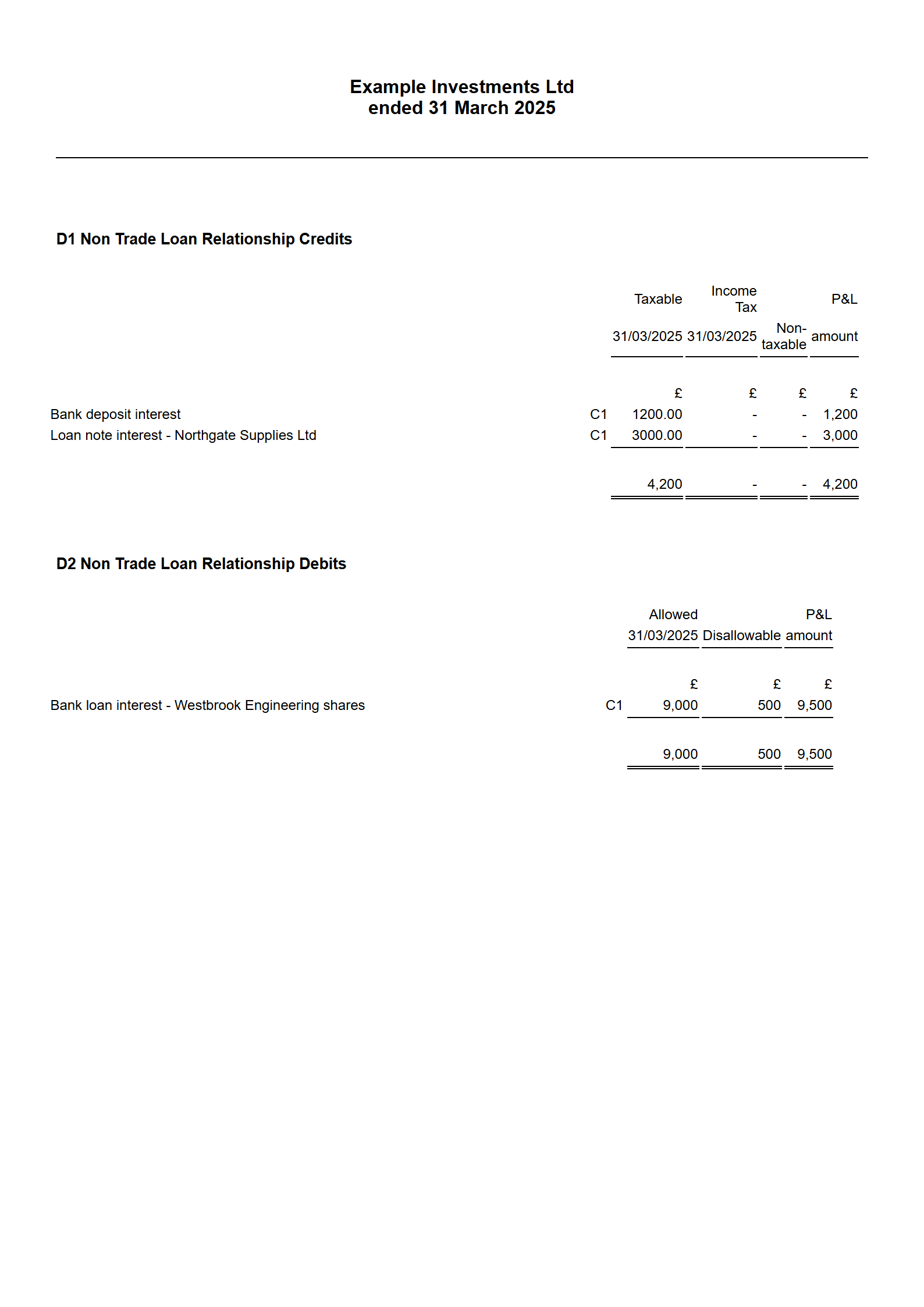
The computation prints the credits and debits together on one schedule, and the profits chargeable page shows the netting.
A worked example
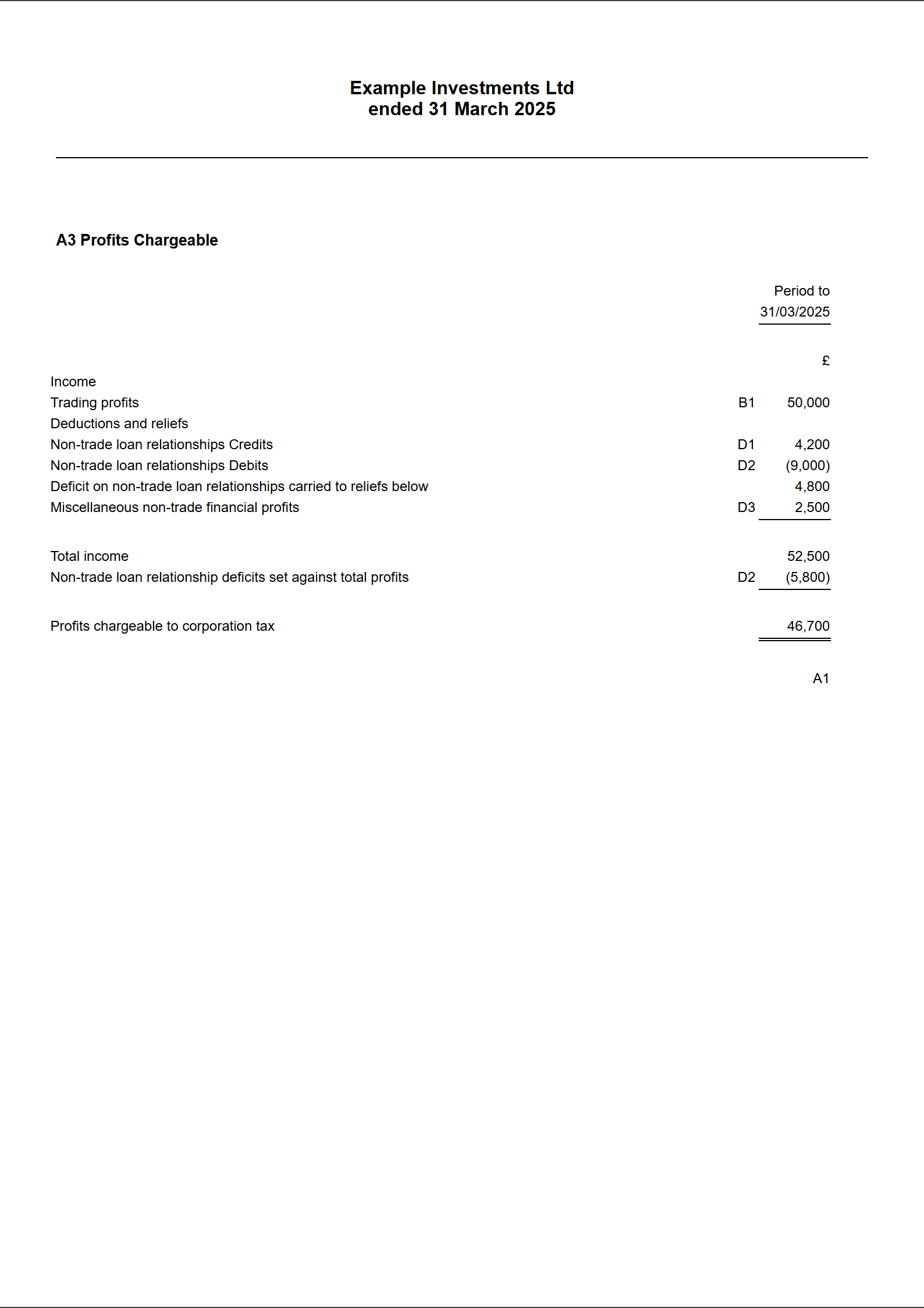
The screenshots come from a demonstration company, Example Investments Ltd, year ended 31 March 2025, which prepares FRS 105 micro-entity accounts — so nothing is picked up automatically. It has two credits, both booked to income accounts inside the £47,200 profit per accounts:
| Credit | Taxable |
|---|---|
| Bank deposit interest | £1,200 |
| Interest on loan notes issued by Northgate Supplies Ltd, an unconnected company | £3,000 |
| Total credits — taken out of the trade | £4,200 |
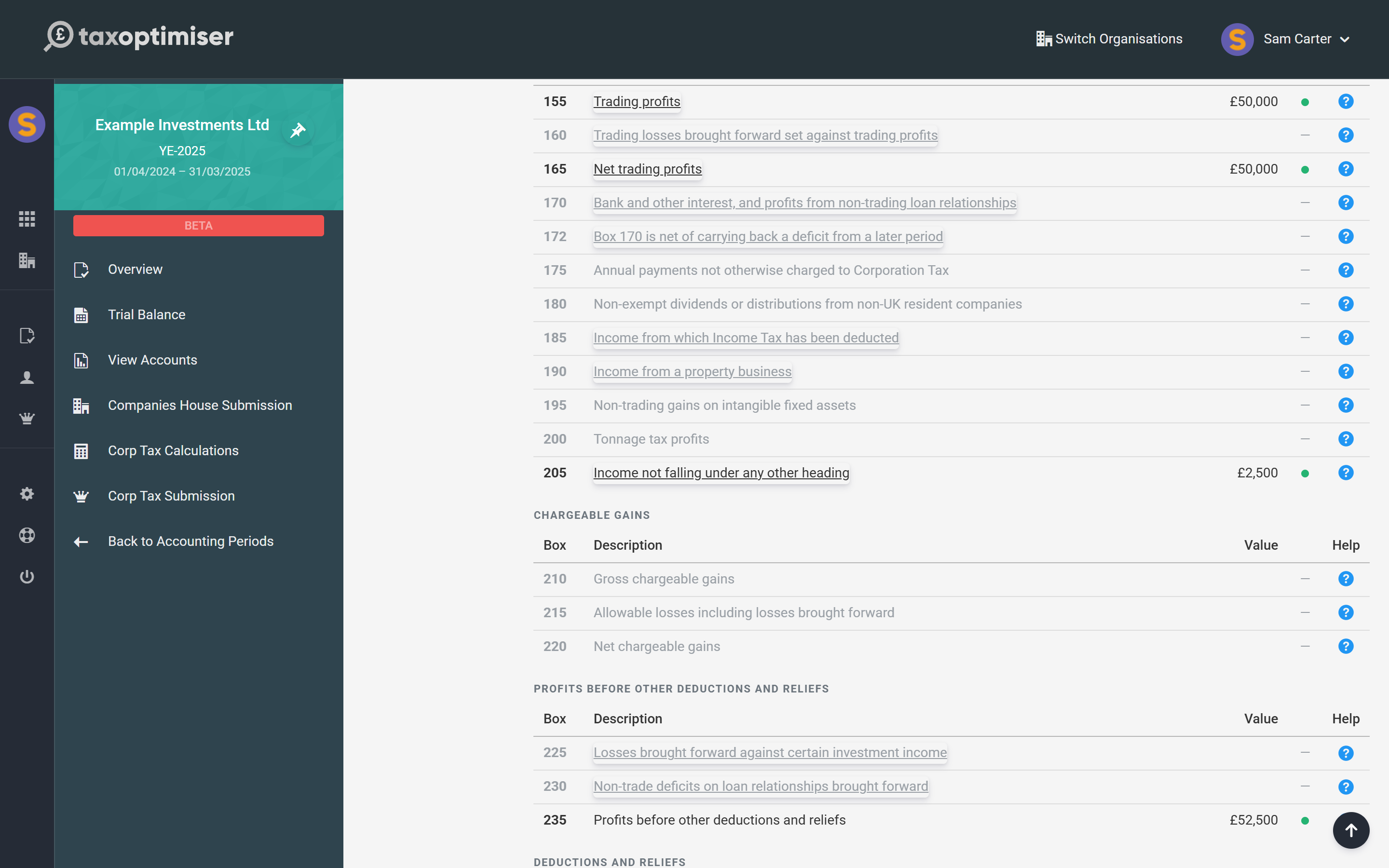
Taking the £4,200 out (along with a £2,500 introducer fee that goes to box 205) gives a trading profit of £50,000. Had that been all, box 170 would be £4,200. But the company also paid £9,000 of allowable interest on a bank loan it took out to buy shares, which is a non-trade debit. Credits of £4,200 less debits of £9,000 is a deficit of £4,800: box 170 is nil, and the deficit is relieved against the company’s other profits in box 260. The Non Trade Debit guide follows the example through.
Income tax deducted at source: boxes 515, 520 and 525
Very little interest reaches a company with tax taken off today — banks pay gross, and interest between UK companies is exempt from deduction. Where a payer did deduct UK income tax, their certificate shows the gross interest and the tax. Enter the gross figure in Taxable and the tax in Income Tax. The income is taxed gross in box 170 and the tax already suffered is credited:
- it goes in box 515, together with anything entered in the Income Tax Suffered section, and reduces the tax payable in box 525;
- if the income tax suffered is more than the Corporation Tax chargeable in box 510, box 525 is nil and the excess is repayable: it goes in box 520 and is claimed in box 870 of the repayment section. Enter the company’s bank details so HMRC can pay it — see CT600 repayments, box by box.
Foreign tax taken off interest from abroad is not UK income tax. It does not go in this column; it may be relieved as double taxation relief instead, which Tax Optimiser does not calculate.
Box 172 — a deficit carried back from a later year
A non-trading deficit can be carried back and set against the previous year’s non-trading loan relationship profits. When that happens, the earlier return is amended: its box 170 is reduced by the deficit carried back and box 172 is ticked to say so. Tax Optimiser does not calculate the carry-back, so apply it by hand on the earlier period’s return:
- reduce the Taxable figure on one or more credit rows by the amount carried back;
- increase Non Taxable on the same rows by the same amount, so the P/L Amount still matches the accounts;
- tick Box 170 figure is net of a deficit carried back from a later period below the grid.
The carry-back can only reduce box 170 to nil — it cannot create a loss in the earlier year.
Things to check
- Counted twice. On FRS 102 accounts, interest in “Other interest receivable and similar income” is already included. Look for the automatic line on the accounts adjustments page before adding a row.
- Left in the trade. On FRS 105 accounts nothing is automatic. Interest you do not enter stays in box 155 — the total tax may come out the same, but it cannot be netted against non-trade interest paid, and box 170 is wrong.
- Enter the gross figure. Taxable is the interest before any income tax deducted.
- Dividends are not credits. Most dividends received are exempt and are not entered in any non-trade grid.
- Interest from a connected company or a director. Still a non-trading credit, and still taxable when it accrues in the accounts, whether or not it has been paid.
- Charities. A charity claiming full exemption on its CT600E has box 170 at nil.
CT600 box by box
Box numbering follows the CT600 (2026) Version 3 form. Every other box is in the CT600 box-by-box guide.
Box 170 — Bank and other interest, and profits from non-trading loan relationships
The net surplus on the company’s non-trading loan relationships: the Taxable column of the Non Trade Credit grid, plus interest picked up automatically from “Other interest receivable and similar income”, less the Allowable column of the Non Trade Debit grid. Nil when the debits are larger — a net deficit is never negative income, it is a relief in box 260. On a long period of account each return takes its own Taxable column, and the automatic interest is split between them by days.
Box 172 — Box 170 is net of carrying back a deficit from a later period
An “X” box, ticked when the figure in box 170 has already been reduced by a non-trading deficit carried back from the following accounting period. Set by the tick box below the Non Trade Credit grid, and only sent with the return when box 170 has a figure.
Box 235 — Profits before other deductions and reliefs
Boxes 165 to 205 and 220 added together, less boxes 225 and 230. Box 170 is part of it.
Box 515 — Income Tax deducted from gross income included in profits
The Income Tax column of the Non Trade Credit grid plus the figure in the Income Tax Suffered section, in pounds and pence. It is credited against the tax chargeable in box 510.
Box 520 — Income Tax repayable to the company
Box 515 minus box 510, when box 515 is the larger. The same figure is claimed in box 870 of the repayment section.
Box 525 — Self-assessment of tax payable
Box 510 minus box 515, never below zero.
Common questions
Is bank interest received by a company trading income?
No. Unless lending money is the company’s trade — a bank or a finance company — interest it receives is a non-trading loan relationship credit. It is taxed in box 170 of the CT600, not in the trading profit in box 155.
Where does bank interest go on the CT600?
Box 170, “Bank and other interest, and profits from non-trading loan relationships”, after netting against any non-trade interest the company paid. If the interest paid is larger, box 170 is nil and the difference is a non-trading deficit relieved in box 260.
Do I need to enter bank interest if it is already in the accounts?
On FRS 102 accounts, interest in the “Other interest receivable and similar income” group is picked up automatically — do not enter it again. On FRS 105 micro-entity accounts, or wherever the interest is posted to another income account, enter it in the Non Trade Credit section.
What is the Non Taxable column for?
For any part of the amount in the profit and loss account that is not a taxable credit. It is taken out of the trading profit with the rest of the P/L Amount but is not added to box 170. It is also how a deficit carried back from a later year is applied: move the carried-back amount from Taxable to Non Taxable.
What happens if income tax was deducted from interest the company received?
Enter the gross interest in Taxable and the tax in Income Tax. The tax goes to box 515 and reduces the Corporation Tax payable; if it is more than the Corporation Tax due, the excess is repaid through boxes 520 and 870.
What does box 172 mean?
That the box 170 figure has already been reduced by a non-trading deficit carried back from the next accounting period. Tick it on the earlier year’s return when you amend it for the carry-back.
Are dividends received loan relationship credits?
No. Dividends are distributions, not returns on a debt, and most that a UK company receives are exempt from Corporation Tax. They are not entered in the Non Trade Credit section.
Where to go next
- Non-trade loan relationship debits and deficits — interest the company pays, and boxes 260, 263 and 795.
- Non-trade income and box 205 — one-off income outside the trade.
- CT600 repayments, box by box — how repayable income tax is claimed.
- HMRC’s Corporate Finance Manual — the detailed loan relationship rules.