
If a company claims research and development tax relief, the claim is not just a number on the main return. It is set out on CT600L, a supplementary page of the Company Tax Return, which walks the credit through a fixed sequence of steps until it has either paid tax, been carried forward, or turned into cash. This guide explains when you need a CT600L, which R&D scheme you are in, how to enter a claim in Tax Optimiser, and what every box on the form means.
When a company needs a CT600L
You file a CT600L with the return whenever the company is claiming:
- the R&D expenditure credit (RDEC) — including the merged scheme that replaced both old schemes for accounting periods beginning on or after 1 April 2024;
- a payable R&D tax credit under the old SME scheme, or under ERIS, the enhanced support for loss-making R&D-intensive SMEs; or
- an RDEC brought forward from an earlier period, or surrendered to or from a group company.
A company that claims only an enhanced deduction and has no credit to track — an SME claim for a pre-April-2024 period that simply increases a loss — does not need the page. If in doubt, enter the claim: Tax Optimiser attaches the CT600L when there is something on it to report, ticks box 142 on the main return to say so, and leaves the page off when every box is nil, because HMRC rejects a return whose box 142 and attached pages disagree.
Two deadlines matter more than the form. A claim must be made in a Company Tax Return, and it can be made or amended up to two years after the end of the accounting period. And the claim notification and additional information forms below are not paperwork — without them HMRC removes the claim from the return altogether.
Which R&D scheme are you in
The scheme follows the start date of the accounting period, not the date of the spend, and it decides which half of the CT600L you complete.
| Period begins | Company | Scheme | CT600L boxes |
|---|---|---|---|
| On or after 1 April 2024 | Any size | Merged scheme RDEC — a taxable credit of 20% of qualifying expenditure, worth about 15p in the pound after Corporation Tax | L10–L150 |
| Loss-making, R&D-intensive SME | ERIS — an 86% extra deduction and a payable credit of 14.5% of the surrenderable loss, worth up to about 27p in the pound. The intensity threshold is qualifying R&D of at least 30% of total relevant expenditure | L166–L190 | |
| Before 1 April 2024 | SME | Old SME scheme — enhanced deduction plus, for a loss-maker, a payable credit | L166–L190 |
| Large, or an SME on subsidised or subcontracted work | Old RDEC | L10–L150 |
Two rules bite on nearly every modern claim and are worth checking before the numbers go anywhere near the form:
- Overseas work is largely out. For periods beginning on or after 1 April 2024, payments for externally provided workers and for contracted-out R&D generally only qualify where the work is done in the UK, with a narrow exception where the conditions genuinely cannot be replicated here.
- There is a cap on the cash. The payable credit is limited to £20,000 plus 300% of the company’s relevant PAYE and National Insurance liabilities for the period — the Step 3 test below. A company with a large claim and a small payroll will not get all of it in cash.
Two forms HMRC will remove your claim without
Both are separate online submissions, not boxes on the return, and both have caught out companies that had a perfectly good claim:
- The claim notification form. For accounting periods beginning on or after 1 April 2023, a company that is new to claiming — or that has not claimed in the previous three calendar years — must notify HMRC in advance, and no later than six months after the end of the period of account. Miss it and the claim is invalid, with no appeal. Confirm it on the return in box 656.
- The additional information form. Every claim submitted on or after 8 August 2023 needs one, sent before the Company Tax Return that carries the claim. It lists the projects, the qualifying costs and the competent professional behind the claim. Without it HMRC removes the R&D figures from the return. Confirm it in box 657.
Tax Optimiser gives both their own tick boxes on the R&D screen so the answer is recorded with the claim rather than in somebody’s inbox.
Enter an R&D claim in Tax Optimiser
Open the accounting period’s Corp Tax workspace and choose R & D Expenditure in the sections menu.
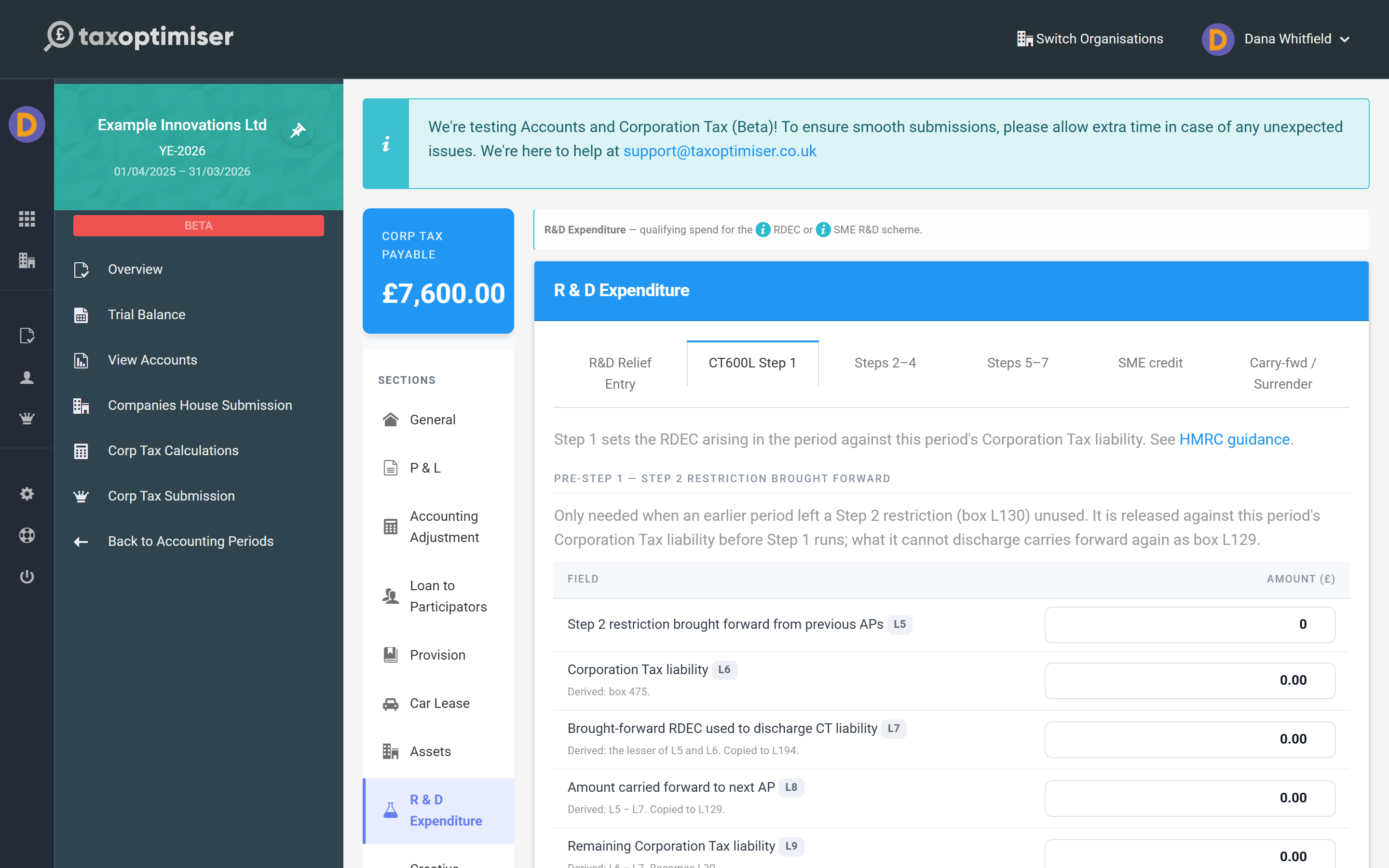
The section has six tabs. The first, R&D Relief Entry, holds the R&D boxes on the main CT600 — enhanced expenditure (box 660), subcontracted R&D (box 665) and the claim indicators including the two forms above. The other five are the CT600L itself, in the order HMRC works through it. The small grey chips beside every field (L15, L45, L125…) tell you which box that figure is, and hovering a row explains the rule in a sentence.
On CT600L Step 1 you type the claim: qualifying expenditure in L10 and the credit itself in L15. Everything below them is calculated.
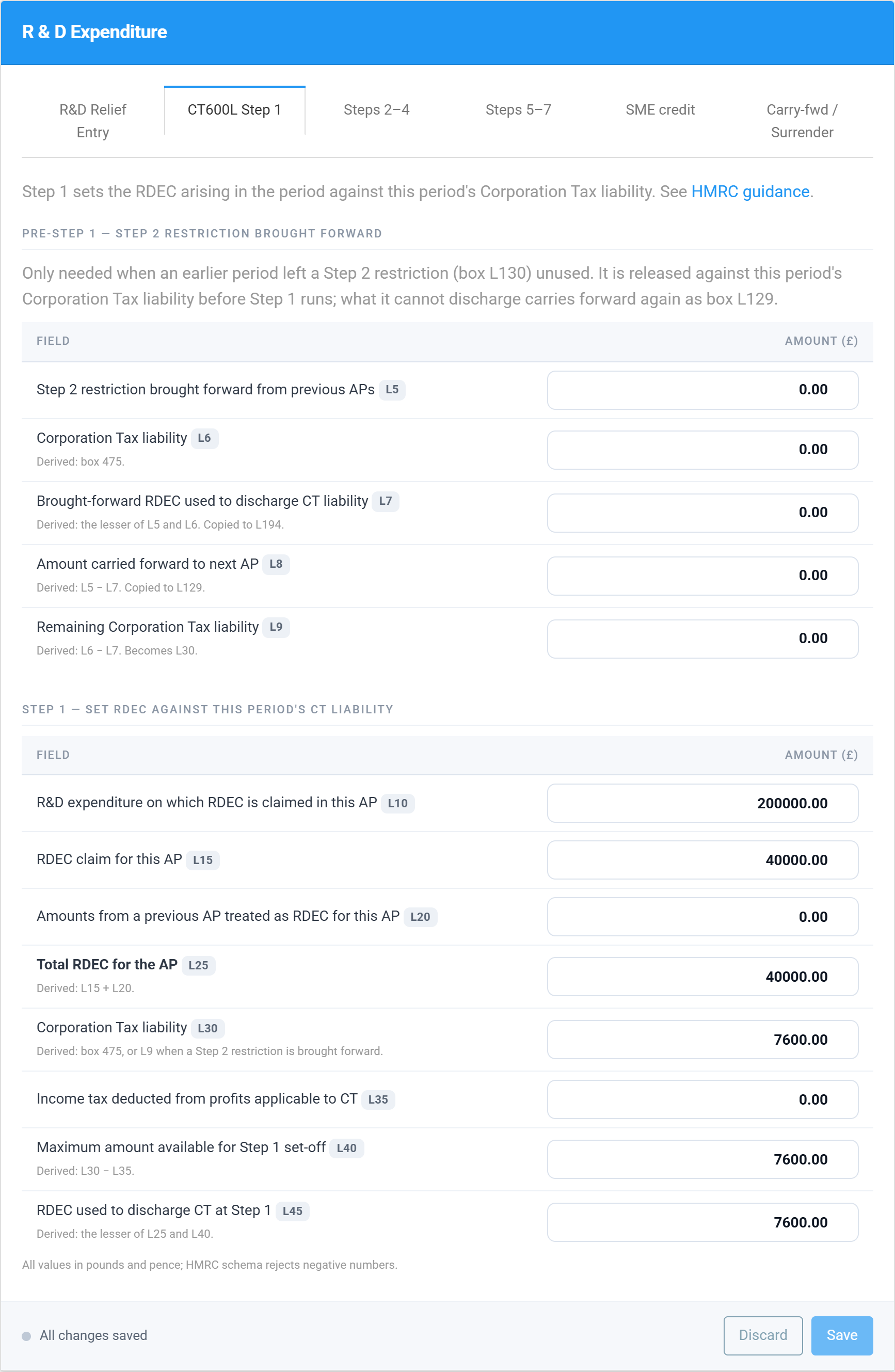
On Steps 2–4 you give the Step 3 cap its inputs — the PAYE and NIC the company is liable for (L72), its employer PAYE reference (L72A), and the same figures for connected companies (L73, L73A). The cap itself, and the restriction it produces, are worked out for you.
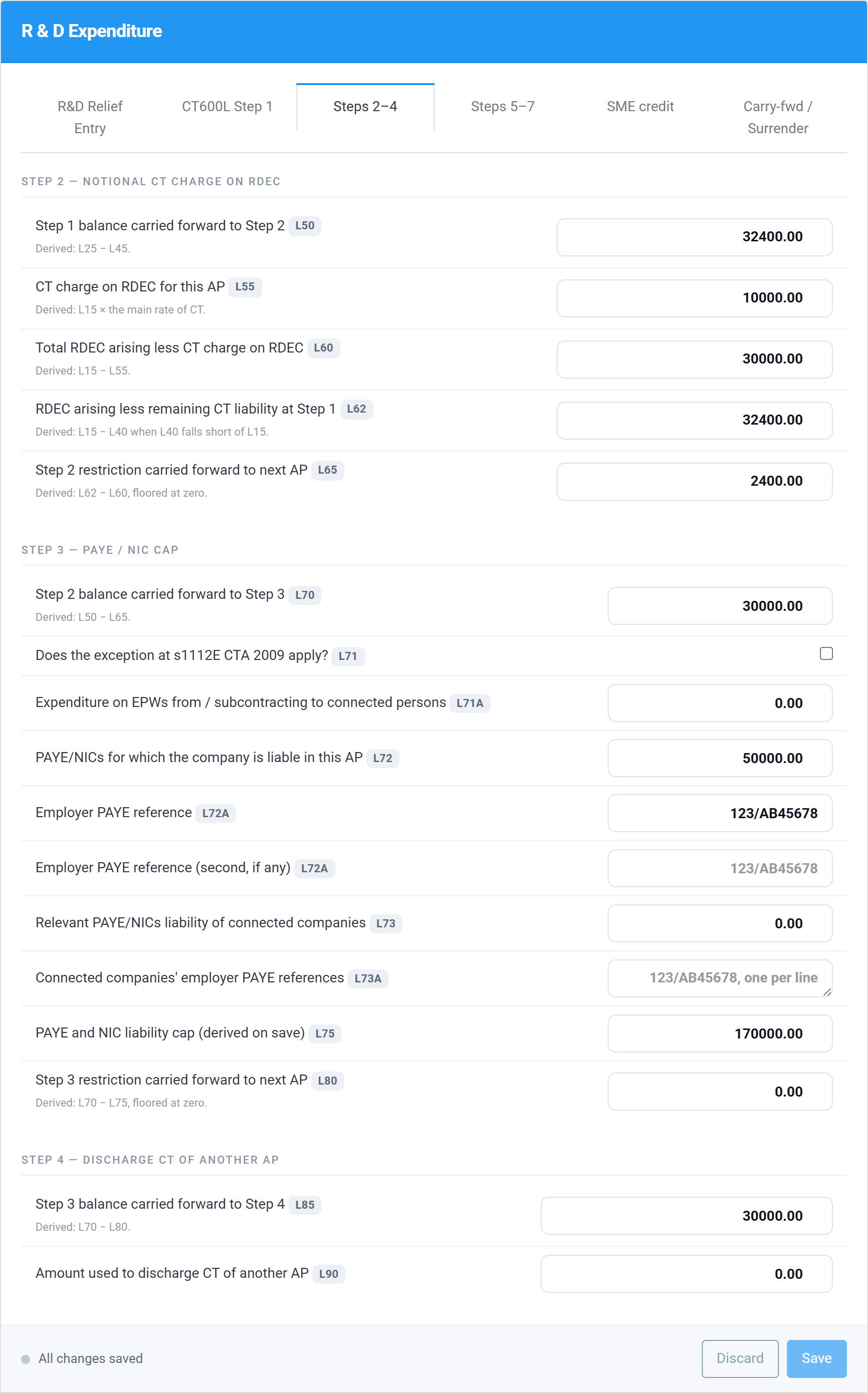
Steps 5–7 covers surrenders to group members and the discharge of other liabilities, and ends with the figure most people came for: the payable RDEC in box L125.
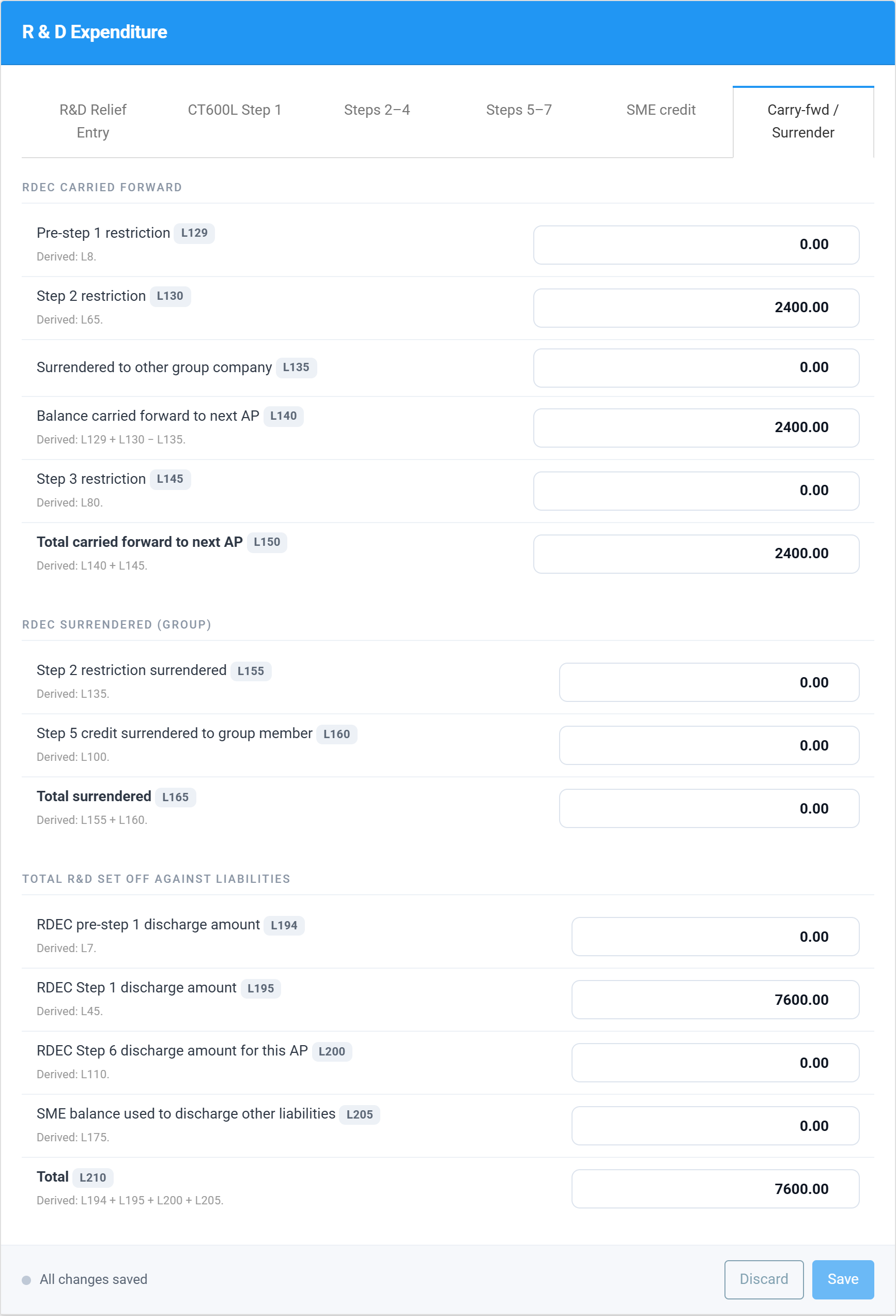
Carry-fwd / Surrender collects the amounts that could not be used this year and must be tracked into the next return, together with the summary of everything the credit has discharged.
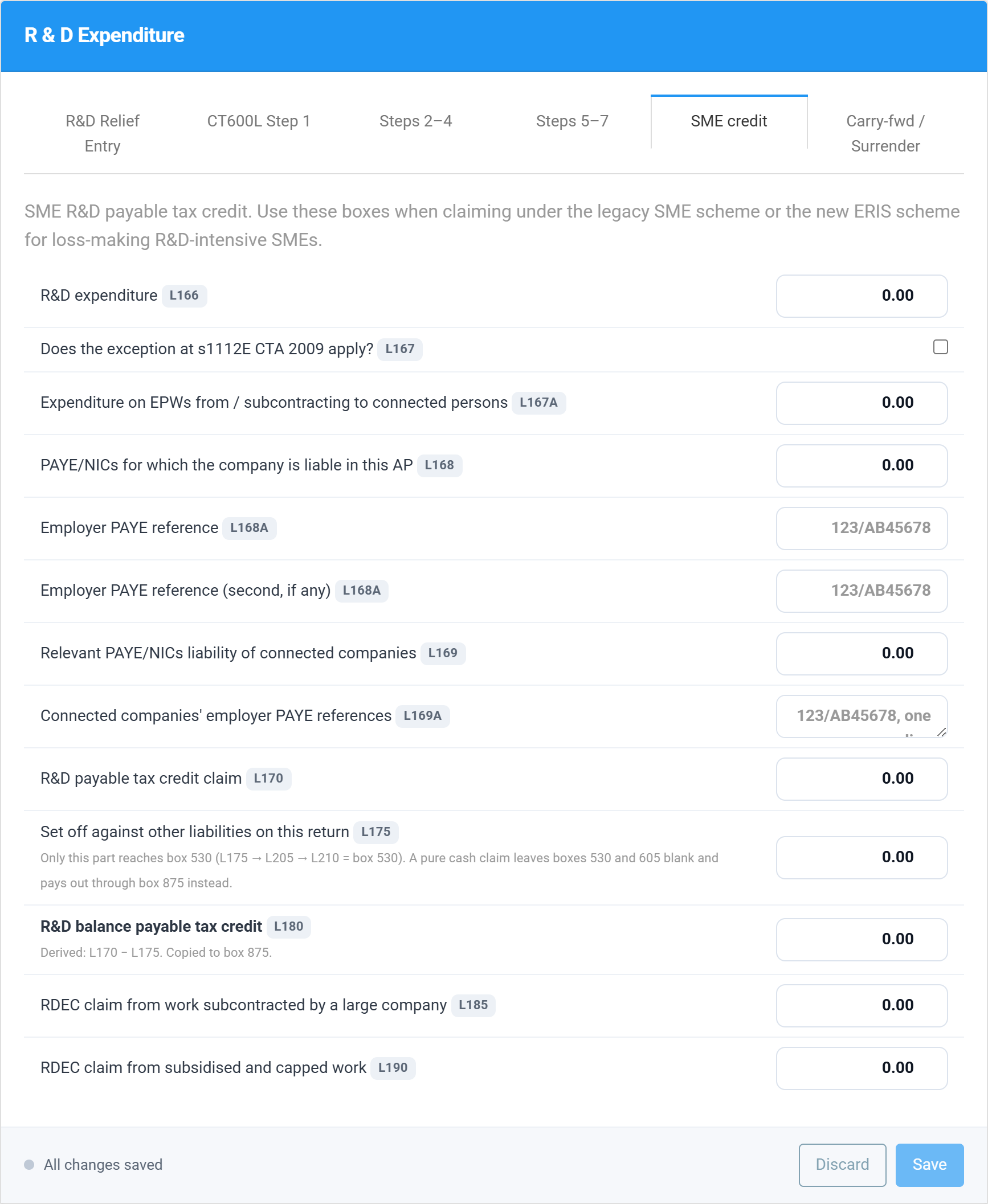
And SME credit is where an ERIS or old-SME payable credit goes — expenditure in L166, the claim in L170, and how much of it is being used against other liabilities on this return in L175.
Then Save. Saving is what runs the calculation: every derived box is rewritten from the figures you typed, so the schedule on screen is the schedule that will be filed.
A worked example
The screenshots come from a demonstration company, Example Innovations Ltd, with a 31 March 2026 year end — a merged-scheme period. It spent £200,000 on qualifying R&D, giving an RDEC of £40,000 at 20%, and its taxable profits leave a Corporation Tax bill of £7,600. Watch what the seven steps do to that £40,000:
| Step | What happens | Box | Amount |
|---|---|---|---|
| 1 | The credit pays this year’s Corporation Tax first | L45 | £7,600 |
| 2 | What is left is capped at the credit’s value after notional tax; the excess is carried forward | L65 | £2,400 restricted |
| 3 | The PAYE/NIC cap is tested: £20,000 + 300% × £50,000 = £170,000, comfortably above the balance | L75 / L80 | no restriction |
| 4–6 | Nothing surrendered to the group, no other liabilities to discharge | L90–L120 | — |
| 7 | The rest is paid to the company in cash | L125 | £30,000 |
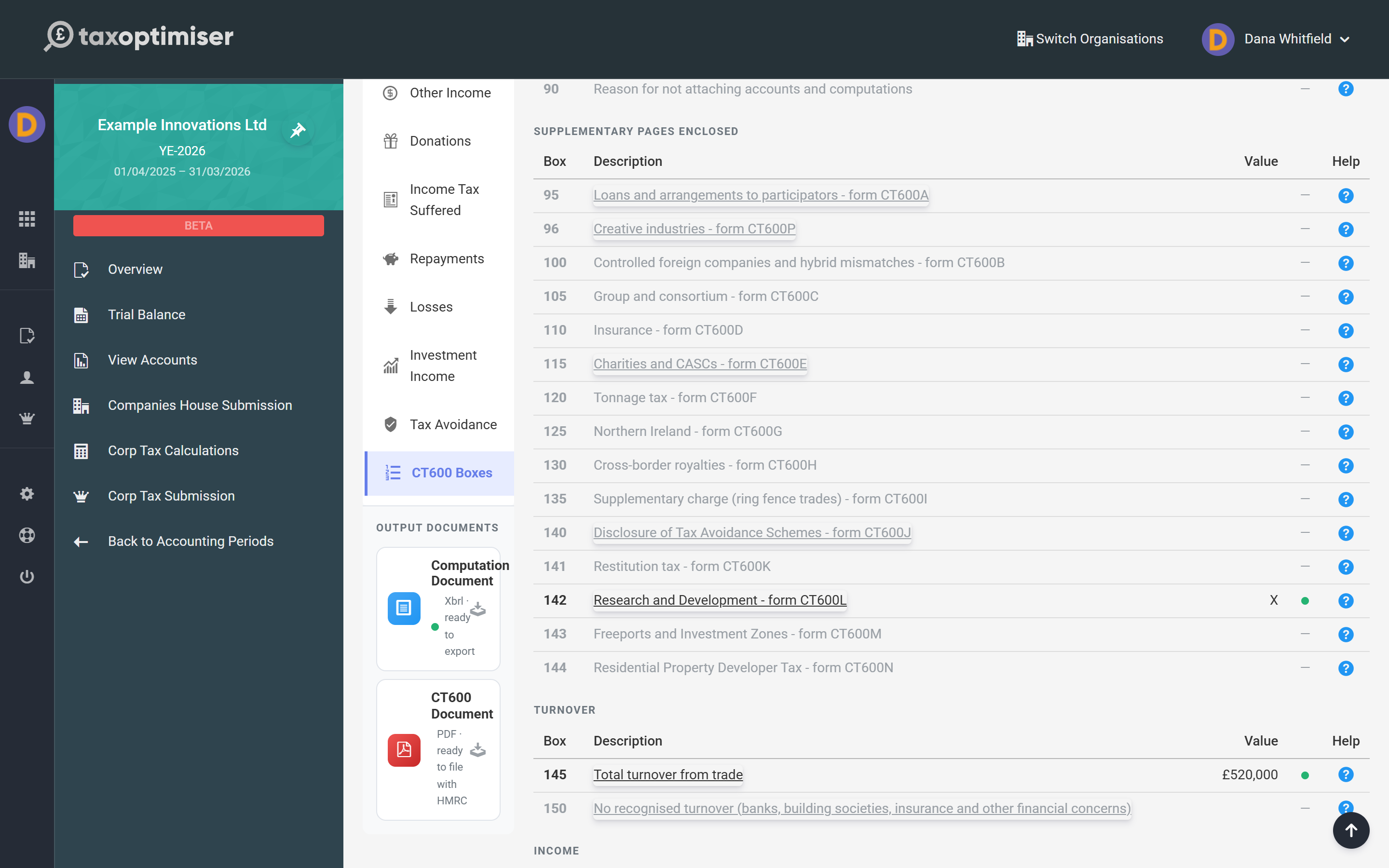
On the main return, box 142 is ticked to say a CT600L is attached…
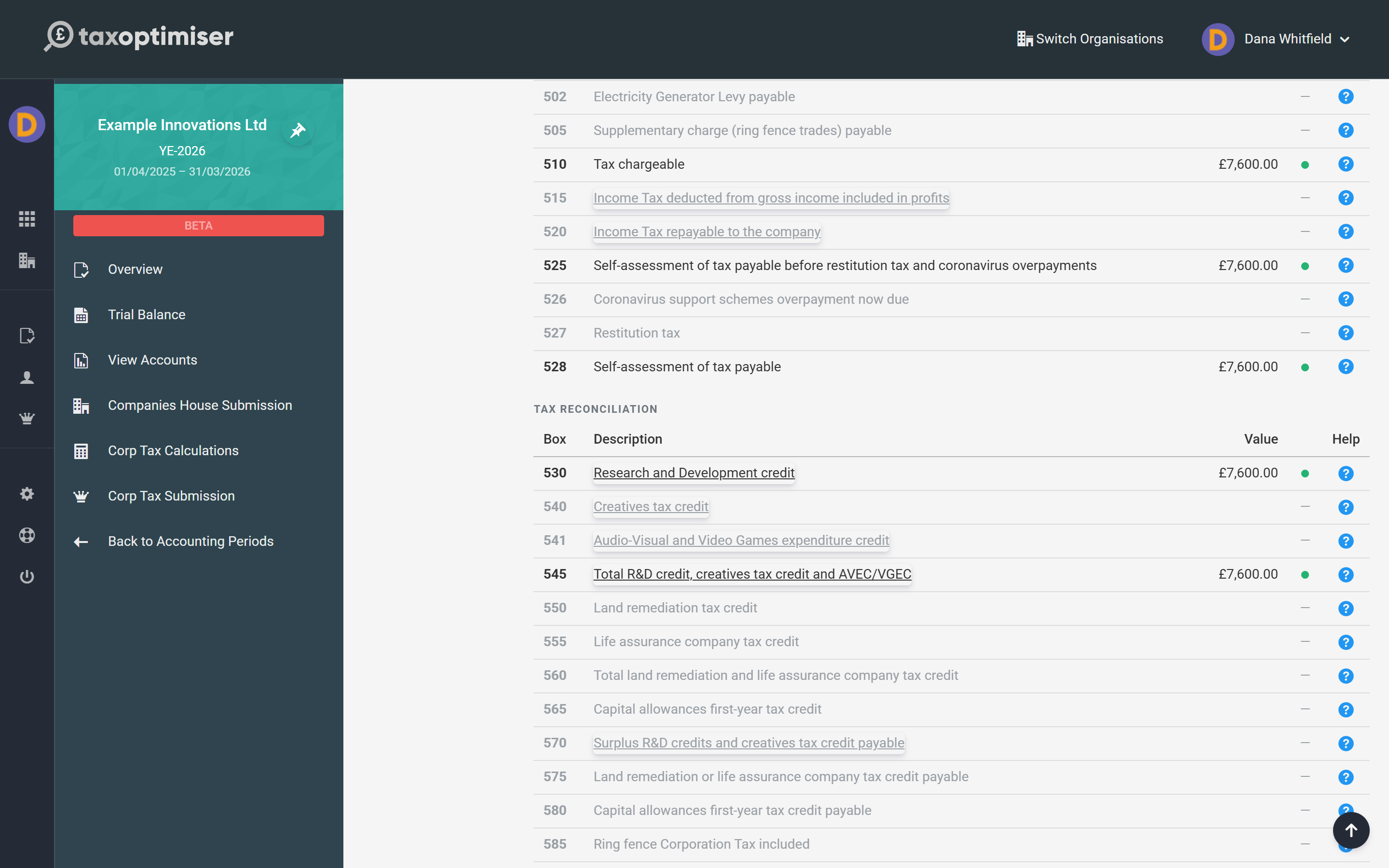
…box 530 carries the £7,600 the credit has set against the tax…
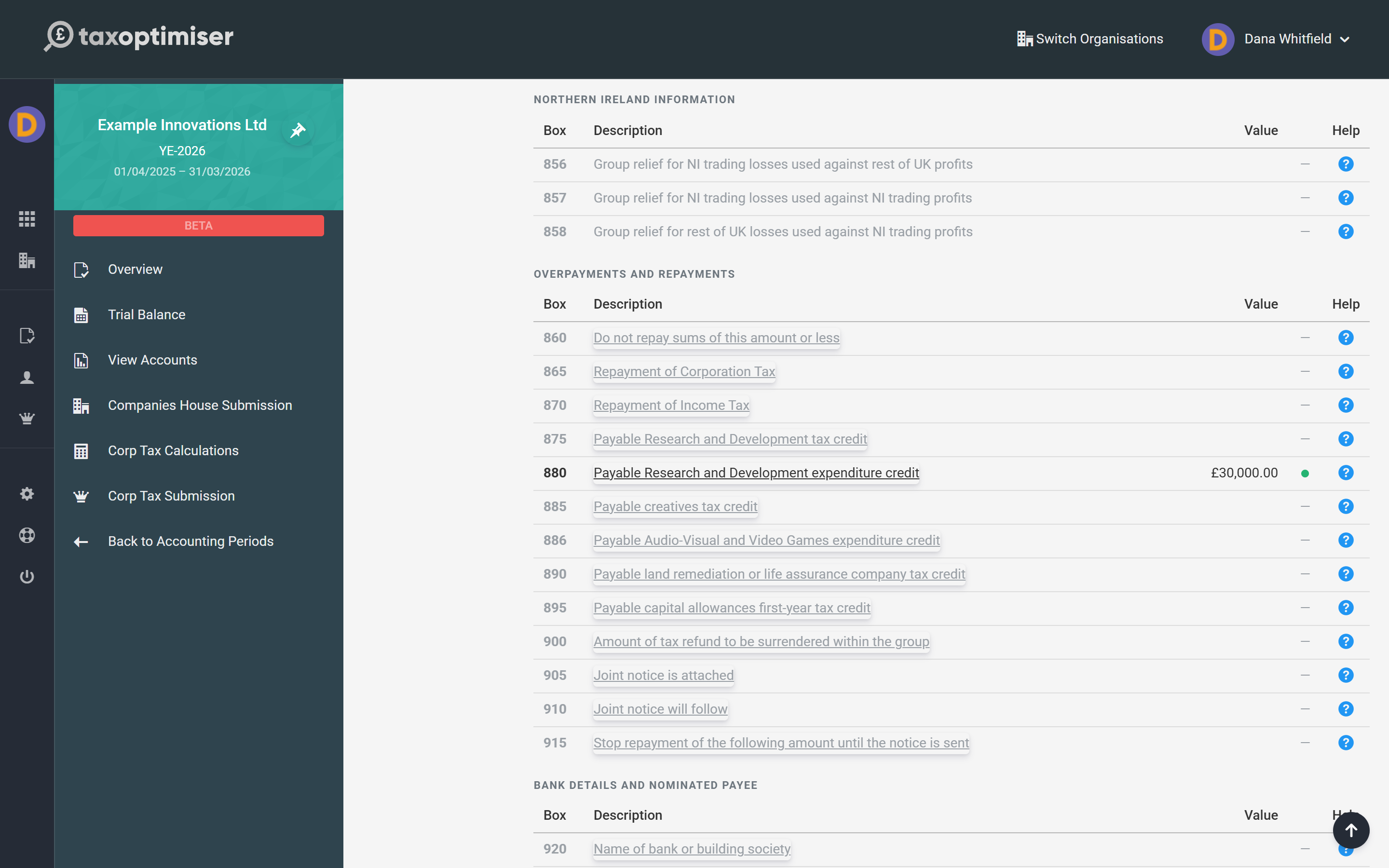
…and box 880 claims the £30,000 as a repayment, which is paid out through the return’s repayment section along with any other overpayment.
The computation says the same thing in one page: £7,600 of Corporation Tax, extinguished by the credit, and £30,000 repayable.
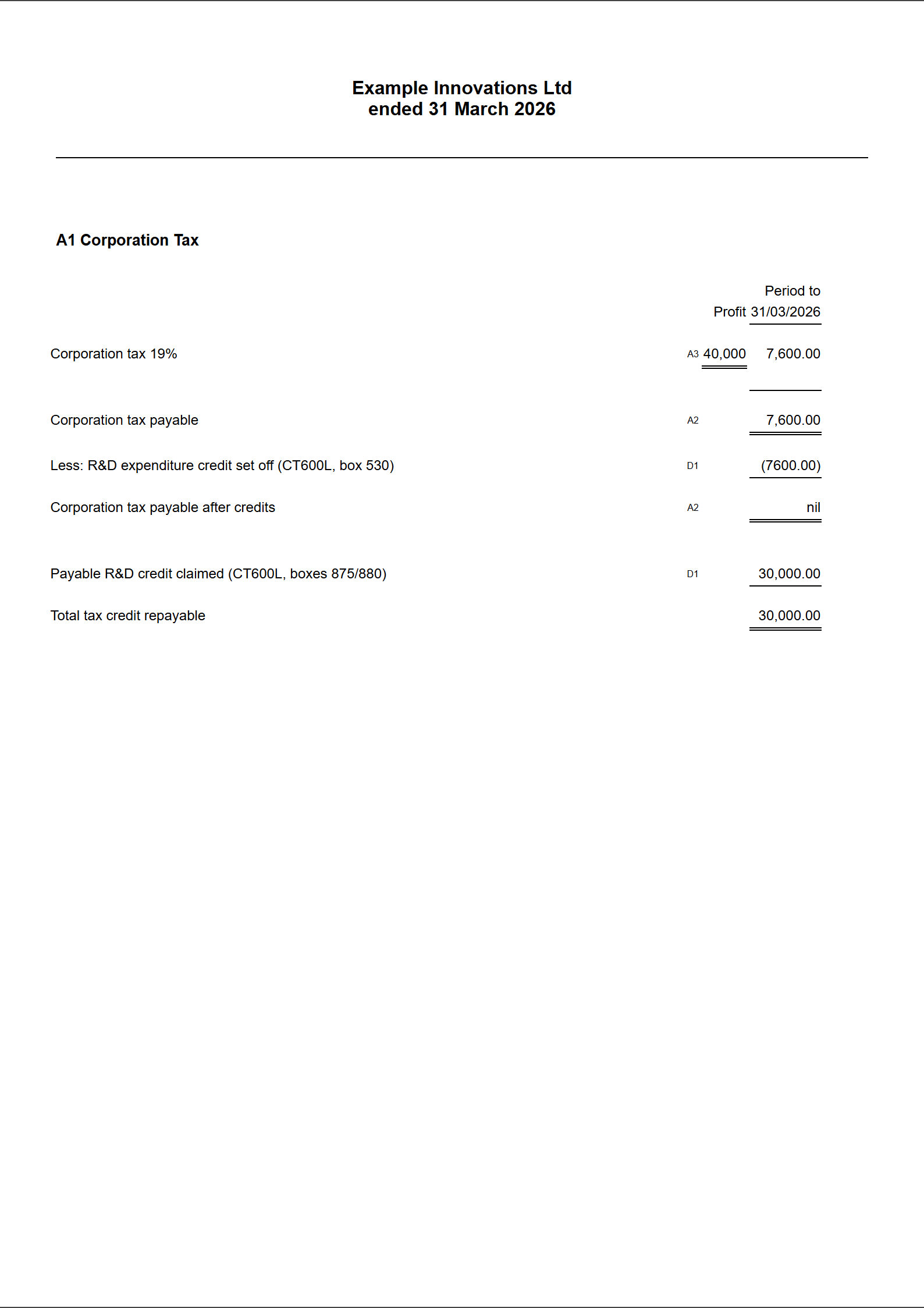
Three things in that example surprise people. The credit pays the tax bill before anything is paid out, so a profitable claimant sees less cash than the headline 20%. The £2,400 restricted at Step 2 is not lost — it is carried forward and treated as RDEC of the next period (box L20 on next year’s form). And the £30,000 is a repayment, not a reduction: it arrives as money, which is why the payable credit boxes sit in the repayment section of the CT600.
The seven steps, in plain English
HMRC’s sequence is fixed. The credit is offered to each use in turn and only what survives reaches the next step:
- Step 1 — this period’s Corporation Tax. The credit discharges the company’s own Corporation Tax liability for the period first (boxes L30–L45).
- Step 2 — the notional tax restriction. The credit is taxable, so the amount that can go further is limited to its net-of-tax value. The excess is carried forward, not lost (L50–L65).
- Step 3 — the PAYE/NIC cap. What is left is capped at £20,000 plus 300% of the company’s relevant PAYE and NIC. Anything above the cap carries forward (L70–L80).
- Step 4 — Corporation Tax of another period. The balance can settle the company’s Corporation Tax for any other accounting period (L85–L90).
- Step 5 — surrender to a group member. Some or all of it can be surrendered to another company in the group (L95–L100).
- Step 6 — other liabilities. What remains is set against any other liability the company owes HMRC (L105–L120).
- Step 7 — payment. Only now is the remainder paid to the company (L123–L125).
The ERIS and old-SME payable credit does not run through the steps. It is claimed directly in boxes L166–L190, with the same PAYE/NIC cap applied to it.
CT600L box by box
Box numbering follows the CT600L (2021) Version 3 form. Boxes on the main CT600 — 475, 530, 650 to 680, 875 and 880 — are covered in the CT600 box-by-box guide. Where a box says derived, Tax Optimiser calculates it and the field is read-only: HMRC pins it to an exact arithmetic identity, so a typed figure could only agree by luck, and a return that disagrees is rejected.
Box L5 — Step 2 restriction brought forward from previous accounting periods
An amount restricted at Step 2 of an earlier period’s calculation, now being released. This is the only figure you type in the pre-Step 1 section; leave it nil and the whole section drops off the form.
Boxes L6 to L9 — releasing the brought-forward restriction
The released amount is used against this period’s tax before Step 1 even starts. L6 is the Corporation Tax liability (always box 475 on the main return), L7 the lesser of L5 and L6 — what the brought-forward amount actually discharges — L8 the part it cannot, which carries forward again as L129, and L9 the liability left over, which becomes L30. All four are derived.
Box L10 — R&D expenditure on which RDEC is claimed in this AP
Total qualifying expenditure behind the claim. It is also the yardstick for the connected-party limit in L71A, so it has to be the real figure rather than a rounded one.
Box L15 — RDEC claim for this accounting period
The credit itself: qualifying expenditure at the rate for the period — 20% under the merged scheme and for RDEC periods from 1 April 2023, 13% before that. This is the single most important figure on the page; every restriction below is measured against it.
Box L20 — Amounts from a previous AP treated as RDEC for this AP
Credit that was restricted in an earlier period (its box L150) and is now treated as arising in this one. This is where last year’s carried-forward restriction comes back.
Box L25 — Total RDEC for the accounting period
Derived: L15 + L20. The pot the seven steps work through.
Box L30 — Corporation Tax liability
Derived: the net Corporation Tax liability from box 475 of the main return, or L9 where a restriction was brought forward. HMRC requires the two to match, so Tax Optimiser always copies the return’s own figure rather than letting it be typed.
Box L35 — Income tax deducted from profits applicable to the Corporation Tax liability
Income tax already suffered at source that is set against the same liability. You type this one.
Box L40 — Maximum amount available for Step 1 set-off
Derived: L30 − L35.
Box L45 — RDEC used to discharge Corporation Tax at Step 1
Derived: the lesser of L25 and L40 — the credit pays this year’s tax first, and cannot pay more of it than there is. This figure reappears as L195 and feeds box 530 on the CT600.
Box L50 — Step 1 balance carried forward to Step 2
Derived: L25 − L45.
Box L55 — Corporation Tax charge on the RDEC for this accounting period
The notional tax on the credit. Because RDEC is taxable income, only its after-tax value can go further down the steps. Tax Optimiser derives it at the main rate of Corporation Tax for the period; HMRC’s rule is that the figure cannot be below the credit multiplied by the lowest rate in force.
Box L60 — Total RDEC arising less the Corporation Tax charge on it
Derived: L15 − L55. The net-of-tax ceiling that Step 2 applies.
Box L62 — RDEC arising less the remaining Corporation Tax liability at Step 1
Derived: L15 − L40, where L40 falls short of L15 — the part of this year’s credit that Step 1 could not absorb.
Box L65 — Step 2 restriction carried forward to the next accounting period
Derived: L62 − L60, never below zero. This is the restriction itself: the amount held back because the credit is only worth its net-of-tax value. It is not lost — it reappears in the carried-forward section and becomes L20 on the next return.
Box L70 — Step 2 balance carried forward to Step 3
Derived: L50 − L65.
Boxes L71 and L71A — the s1112E exception
For periods beginning on or after 1 April 2024, tick L71 if the exception at section 1112E CTA 2009 applies — broadly, a company creating its own intellectual property whose spending with connected parties on externally provided workers and contracted-out R&D is no more than 15% of its qualifying expenditure. That figure goes in L71A, and it cannot exceed 15% of L10. Where the exception applies the cap does not restrict the claim at all.
Boxes L72 to L73A — the PAYE and NIC figures
L72 is the PAYE and National Insurance the company itself is liable for in the period, with its employer PAYE reference in L72A (format 123/AB45678; there is room for two). L73 is the relevant PAYE and NIC of connected companies, with their references in L73A, one per line. On a combined RDEC-and-ERIS claim these boxes stay blank and the combined figures go in L167–L169A instead.
Box L75 — Total relevant expenditure on R&D workers’ PAYE and NIC
The cap. For periods beginning on or after 1 April 2024 Tax Optimiser derives it as £20,000 (pro-rated for a short period) plus 300% of L72 + L73; where the L71 exception is ticked it is set equal to L70, so nothing is restricted. For earlier periods it is the relevant expenditure figure you type.
Box L80 — Step 3 restriction carried forward to the next AP
Derived: L70 − L75, never below zero. The amount the payroll cap keeps out of this year’s cash, carried forward as L145.
Box L85 — Step 3 balance carried forward to Step 4
Derived: L70 − L80.
Box L90 — Amount used to discharge the Corporation Tax liability of another accounting period
Credit applied to the company’s Corporation Tax for a different period. You type this one.
Box L95 — Step 4 balance carried forward to Step 5
Derived: L85 − L90.
Box L100 — Credit surrendered to a group member
The amount surrendered to another company in the group at Step 5. It is repeated in L160.
Box L105 — Step 5 balance carried forward to Step 6
Derived: L95 − L100.
Boxes L110, L115 and L120 — other liabilities discharged
L110 is the amount used against another liability assessed on this Company Tax Return, L115 against any other liability the company owes HMRC, and L120 is their total (derived). L110 also appears as L200 in the set-off summary, because it is one of the amounts that makes up box 530.
Box L123 — Amounts not payable
Credit extinguished rather than paid: under section 104S CTA 2009 (the going-concern condition) for periods beginning before 1 April 2024, or under section 1112F(2) on or after. Tax Optimiser relabels the box to match the period.
Box L125 — Payable RDEC
Derived: L105 − (L120 + L123) — the cash. It is claimed on the main return in box 880, and paid out with any other repayment due.
Boxes L129 to L150 — RDEC carried forward
The running total of everything this year’s calculation could not use, which next year’s return picks up in L20.
- L129 — the pre-Step 1 restriction still unused (equals L8).
- L130 — the Step 2 restriction (equals L65).
- L135 — the part of it surrendered to another group company. You type this one.
- L140 — derived: L129 + L130 − L135.
- L145 — the Step 3 restriction (equals L80).
- L150 — derived: L140 + L145. The total carried forward.
Boxes L155 to L165 — RDEC surrendered to group members
L155 mirrors the Step 2 restriction surrendered (L135), L160 the Step 5 surrender (L100), and L165 is their total. All three are derived from the boxes they summarise.
Boxes L166 to L169A — SME and ERIS expenditure and cap figures
L166 is the R&D expenditure behind an SME or ERIS claim. L167 is the exception tick — section 1058D CTA 2009 for periods beginning before 1 April 2024, section 1112E on or after — with the connected-party expenditure in L167A. L168 to L169A are the PAYE and NIC figures and employer references for the cap; on a claim that includes RDEC as well, these carry the combined totals for both schemes.
Box L170 — R&D payable tax credit claim
The payable credit claimed: 14.5% of the surrenderable loss under ERIS and the old R&D-intensive rules, 10% under the standard SME scheme for periods from 1 April 2023.
Box L175 — Set off against other liabilities on this return
How much of the credit is being used against other liabilities on this return rather than paid out. Only this part reaches box 530 — a pure cash claim leaves box 530 empty and pays out through box 875 instead.
Box L180 — R&D balance payable tax credit
Derived: L170 − L175, never below zero. Copied to box 875 on the main return.
Boxes L185 and L190 — SME claims under RDEC
An SME claims RDEC rather than the SME credit where the work was subcontracted to it by a large company (L185) or was subsidised or capped (L190). Both are pre-merger situations; from 1 April 2024 the merged scheme removes the distinction.
Boxes L194 to L210 — total R&D set off against liabilities
The summary HMRC reconciles against the main return: L194 the pre-Step 1 discharge (equals L7), L195 the Step 1 discharge (equals L45), L200 the Step 6 discharge on this return (equals L110), L205 the SME credit used against other liabilities (equals L175), and L210 their total. Box 530 on the CT600 must equal L210, and Tax Optimiser derives it in that direction — from the schedule to the return, never the other way round.
Main return: boxes 142, 530, 875 and 880
Four boxes on the CT600 itself are driven by the CT600L: box 142 (the CT600L is attached), box 530 (R&D credit set against the liability, equal to L210), box 875 (payable SME or ERIS credit, from L180) and box 880 (payable RDEC, from L125). The claim indicators in boxes 650–659 — SME claim, R&D-intensive SME, large-company claim, and the two information forms — live on the first tab of the R&D section. Every one of them is explained in the CT600 box-by-box guide.
What Tax Optimiser derives, and what it will not let you file
HMRC validates the CT600L harder than almost any other page: the whole step chain is a set of arithmetic identities, and a single figure out of line is a rejected submission rather than a query. Tax Optimiser therefore derives every one of them from the handful of figures you type — L5, L10, L15, L20, L35, the Step 3 cap inputs, L90, L100, L110, L115, L123, L135 and the SME boxes — and recalculates the lot on every save and again when the return is built. In practice that means:
- You cannot type over a derived box. If L45 looks wrong, the answer is in L25 or L40, not in L45.
- Box 530 follows the schedule. It is set to L210 when the return is assembled, so a figure entered elsewhere in the computation cannot contradict the supplementary page.
- The Corporation Tax liability is not yours to choose. L30 and L6 are taken from box 475, because HMRC compares them.
- An empty schedule is left off. Nil boxes mean no CT600L and no tick in box 142 — a mismatch between the two is one of HMRC’s most common rejections.
- A PAYE reference must look like one. HMRC’s format is 123/AB45678; anything else fails schema validation before the return leaves the building.
Unlike the CT600A, CT600E, CT600J and CT600P, there is no printed CT600L to preview: HMRC has never published a fillable version of the page, so the schedule is reviewed on the R&D screen and in the computation, and filed as part of the return’s XML.
Common questions
What is a CT600L?
CT600L is the research and development supplementary page of the Company Tax Return. It is filed alongside the CT600 whenever a company claims the R&D expenditure credit, a payable R&D tax credit under the SME or ERIS rules, or is carrying an RDEC forward or surrendering it within a group. It sets out the seven-step calculation that decides how much of the credit pays tax, how much is restricted and how much is paid in cash.
Do I need to file a CT600L for every R&D claim?
You need one whenever there is a credit to track. A claim that only increases a deduction, with no credit and nothing carried forward, does not require the page. Tax Optimiser attaches it when there is something to report and ticks box 142 on the main return to match.
What is the RDEC rate for 2026?
20% of qualifying R&D expenditure under the merged scheme, which applies to accounting periods beginning on or after 1 April 2024. The credit is taxable, so it is worth about 15p in the pound after Corporation Tax at the main rate. RDEC was also 20% for periods from 1 April 2023 and 13% before that.
What is ERIS and who qualifies?
Enhanced R&D Intensive Support is the replacement for the old SME payable credit, for loss-making small and medium-sized companies whose qualifying R&D is at least 30% of their total relevant expenditure. It gives an 86% additional deduction and a payable credit of 14.5% of the surrenderable loss, worth up to around 27p in the pound — considerably more than the merged-scheme credit.
How is the PAYE and NIC cap on the R&D credit calculated?
The payable credit is capped at £20,000 plus 300% of the company’s relevant PAYE and National Insurance liabilities for the period, including those of connected companies where relevant. The £20,000 is pro-rated for an accounting period shorter than twelve months. Anything above the cap is not lost: it is carried forward to the next period.
When will HMRC pay an R&D tax credit?
The credit is claimed on the Company Tax Return and paid as a repayment after the return is processed. HMRC aims to deal with most R&D payments within 40 days of receiving the claim, and longer where it opens a compliance check. It pays only after the credit has been used to settle the company’s own Corporation Tax and any other liabilities — the earlier steps of the calculation come first.
What happens if I forget the claim notification form?
The claim is invalid. For accounting periods beginning on or after 1 April 2023, a company that has not claimed in the previous three calendar years must notify HMRC within six months of the end of the period of account, and there is no discretion to accept a late notification. The additional information form is equally fatal if missed: without it HMRC removes the R&D figures from the return.
Can I still claim R&D relief for an earlier year?
Yes, by amending that period’s Company Tax Return, but only within two years of the end of the accounting period. The claim notification and additional information rules still apply to the period being amended, so check those dates before spending time on the figures.
Why is my payable credit less than the credit I claimed?
Because the steps run in a fixed order. The credit pays the company’s own Corporation Tax first, then is limited to its value after notional tax, then to the PAYE and NIC cap, then to other liabilities — only the remainder is paid. Amounts held back by the Step 2 and Step 3 restrictions are carried forward and treated as credit of the next accounting period.
Where to go next
- Corporation Tax in Tax Optimiser — the full journey from trial balance to filed return.
- CT600 box-by-box guide — every box on the main return, including 530, 875 and 880.
- Losses and how they are carried — relevant when an R&D claim turns a profit into a loss.
- Repayments and how HMRC pays them — what happens to boxes 875 and 880 once the return is filed.
- HMRC’s CT600L guidance and the Company Tax Return guide.