
Beta feature — Partnership (SA800) returns are in beta and open to everyone — accountant firms and partnerships filing their own return — for the 2025-26 tax year. If anything looks wrong, email support@taxoptimiser.co.uk and the team will help.
The first step of the wizard captures the partnership’s identity and the whole-return declarations — everything on the front of the SA800 plus the yes/no questions from page 2.
The partnership’s identity
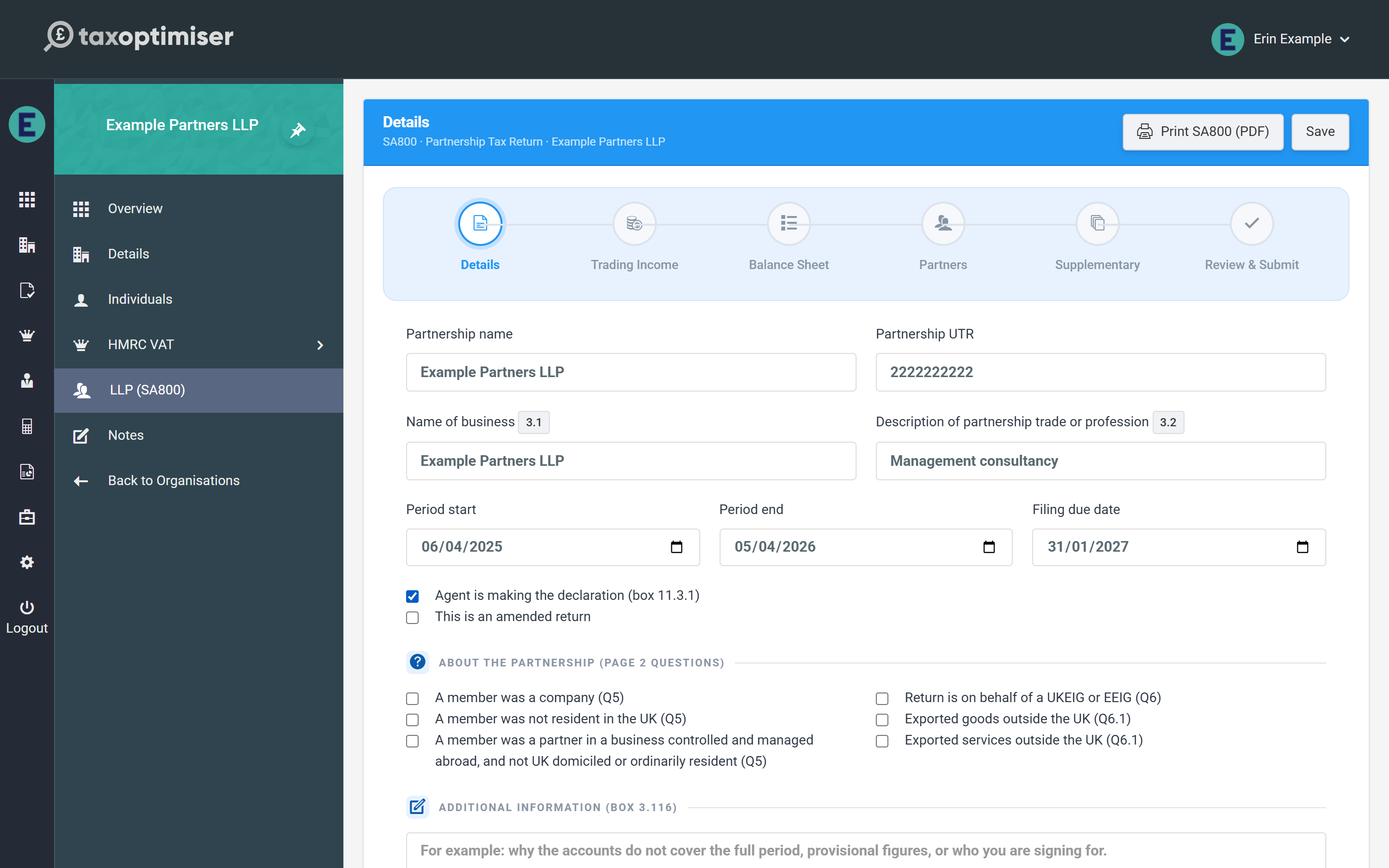
- Partnership name and Partnership UTR — the UTR is checked as you type against HMRC’s own check-digit rule. A UTR that fails the check turns the field red immediately: HMRC rejects a return carrying a bad UTR outright (error 8205), so it is worth fixing here rather than at submission.
- Name of business (box 3.1) and Description of partnership trade or profession (box 3.2) — box 3.1 falls back to the partnership name if left blank.
- Period start / end and the filing due date. The period must end in the 2025-26 tax year.
- Date the business started (box 3.7) and date it ceased (box 3.8) — fill these in only when the business started or ceased during 2025-26. Entering a date answers the form’s “did the partnership start / cease” question “yes”; leaving it blank answers “no”.
Accounting basis and declarations
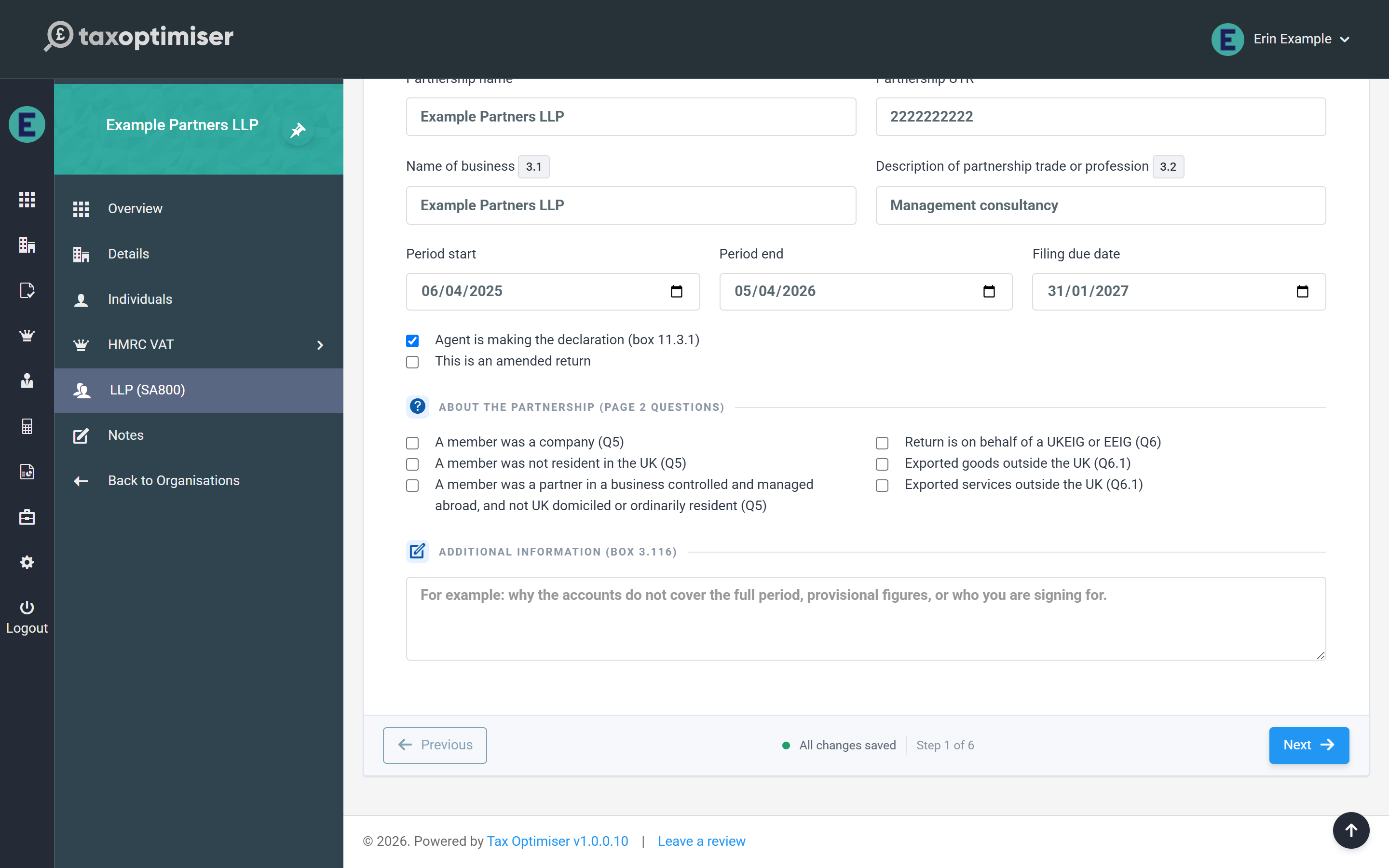
Three checkboxes sit under the dates:
- Traditional (accruals) accounting was used rather than the cash basis (box 3.9) — ticked on new returns. Untick it only for a partnership that really is on the cash basis; an LLP cannot be.
- Agent is making the declaration (box 11.3.1) — tick this when your firm declares on the partnership’s behalf; leave it clear for a partner declaration.
- This is an amended return — ticked for you when you reopen a return HMRC has already accepted; the submission is flagged as an amendment and replaces the original. Amendments to a 2025-26 return can be filed online until 31 January 2028; after that HMRC won’t accept them online, so the return is refused before it is sent and you write to HMRC instead.
The page 2 questions

- Foreign tax taken off (Partnership Statement boxes A, B and H) — tick when the trading profit, the trading loss or the other taxed income (box 23) had foreign tax taken off. Each tick is only filed beside its amount. Box C (foreign savings) and box D (foreign property) are ticked for you from the SA802 figures, and box E (offshore funds) sits with the SA802 figures on the Supplementary step.
- The partnership had no trade or profession (Q3 “no”) — for a property or investment partnership. The trading pages are left off the return altogether: the Trading Income and Balance Sheet steps become read-only (each shows a Change on Details button to bring you back here), and the supplementary pages and the Partnership Statement carry the whole return.
- Questions 5, 6 and 6.1 — whether any member was a company, was not UK resident, or was a partner in a business controlled and managed abroad; whether the return is on behalf of a UKEIG or EEIG; and whether the partnership exported goods, services or neither. (Questions 1, 2 and 4 are answered for you from the supplementary pages you complete.)
- The Partnership Statement is drawn up under Corporation Tax rules / the rules for non-residents (statement boxes 4 and 5) — tick only when it applies to every member, because one statement is filed.
- VAT in the trading figures (boxes 3.27 / 3.28) — say whether the figures include or exclude VAT, for a VAT-registered partnership.
Additional information (box 3.116) is the free-text box HMRC reads for anything that needs explaining — for example why the accounts don’t cover the full period, which figures are provisional and why, or who you are signing for.
The declaration itself — the nominated partner, the provisional-figure ticks, contact telephone, agent’s name and any tax avoidance scheme reference (page 8) — is completed on the Review & Submit step, beside the Submit button.
Next: trading income & expenses.
