
Every page of the return is built the same way, so once you know one you know them all. This article covers the mechanics every page shares — box references, groups, hints, the boxes HMRC insists on, inline warnings and total boxes — and then the SA100’s own income sections. The supplementary pages each have their own article: employment, self-employment, UK property, and the rest.
Every box carries its HMRC reference
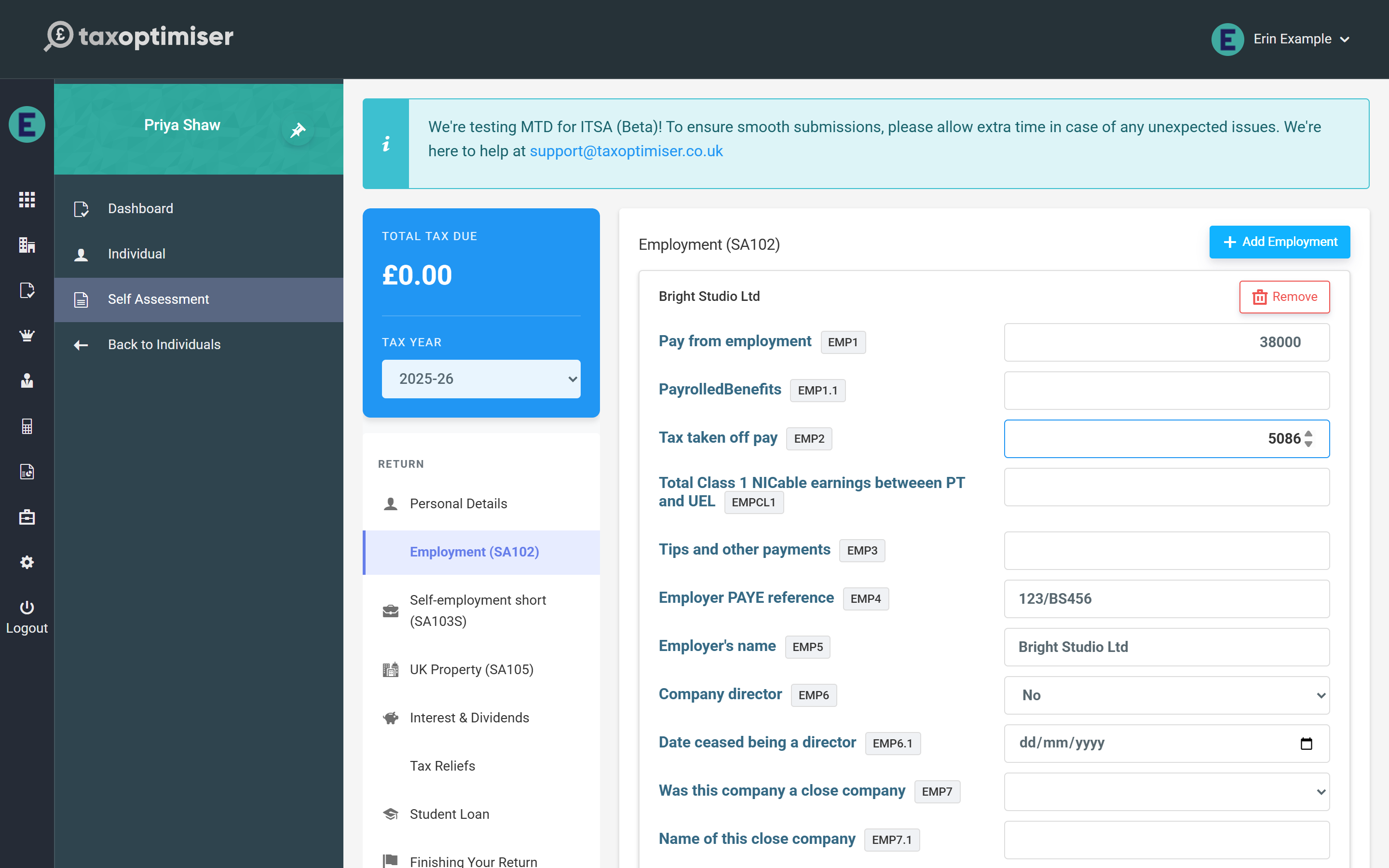
Each box shows a small badge with its HMRC box reference (EMP1, SSE9, INC4…) matching the paper forms and HMRC’s own notes — so if you are working from a P60, accounts or last year’s return, you can cross-check box by box. The boxes are gathered into groups under headings that follow the paper form — Pay and tax, Employer, Allowable expenses and so on. Each heading shows how many of its boxes are filled (“2 of 5”) and can be clicked to fold the group away. On the longer pages a link at the top, Show only groups with figures, hides every empty group so you can review what has been entered without scrolling past the rest.
Hints under the boxes
Where HMRC treats a box in a way that is easy to get wrong, a short hint sits under it: that a figure is information only and not deducted again, that a loss is entered as a negative, that a count is required beside the amounts, that a box is capped or must be below a threshold. The hints come from HMRC’s own rules and from what HMRC’s systems actually do with the box, so they are worth reading the first time you meet a page.

The boxes HMRC insists on
A handful of boxes are mandatory on every page they appear on — the employer’s PAYE reference and the company-director answer on an employment, the business description and the started / ceased answers on a self-employment, the partnership reference, name and joined / left answers on a partnership. They carry a Required chip, which stays red until the box is filled, and a new card’s yes / no questions default to No so that only the genuinely open boxes are left. A card with gaps shows n required boxes missing in its header, and the pre-flight checks name each one before filing.

Some boxes only apply once a question has been answered Yes — the date a business started, the details of a close company for a director — and the page says so when they are then left empty. Free-text boxes accept only the characters HMRC allows (letters, numbers, spaces and a few symbols such as & ( ) , - . /); type anything else, such as a colon or semicolon, and the box warns you straight away, because HMRC would reject the whole return for it. Boxes with a fixed format — a tax year as 2024-25, a pension scheme reference, a company registration number — show an example and warn when the entry does not match.
Inline warnings: what HMRC would reject
Where HMRC has a hard rule about a box — a cap, a box that cannot be used alongside another, a tick that another box needs, an allowance that cannot sit beside the expenses it replaces — the page checks it as you type and shows the rule under the box in red. The entry is still saved, so you can carry on and come back, but the same rule will stop the return at the pre-flight checks until it is put right.

Total boxes add themselves up
Where a total box is simply the sum of the boxes above it, Tax Optimiser adds them up for you. Enter the individual figures and the total box shows what they come to, with a Use this link that fills it in; once the total agrees it shows a tick. The total is never overwritten for you, because HMRC lets a small business enter total expenses on their own without the breakdown. The same hints follow the profit chains on the self-employment, partnership and property pages — adjusted profit, loss brought forward, taxable profit — so a chain that does not add up is visible before HMRC sees it.

Interest, dividends and other SA100 income
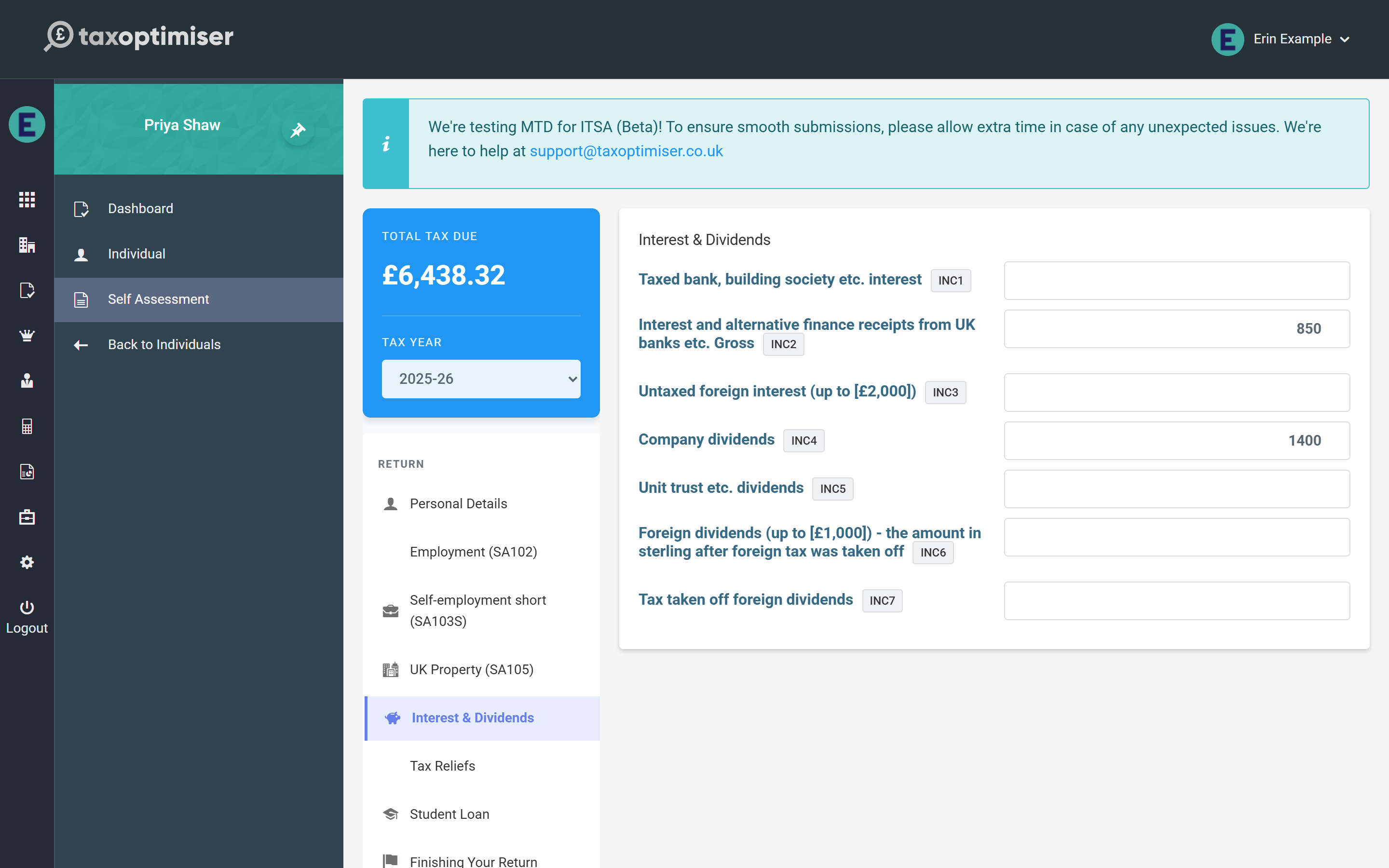
Interest & Dividends takes bank and building society interest (taxed interest is entered net, exactly as the paper form asks, and grossed up in the calculation) and dividends from UK companies and unit trusts, plus the small foreign interest and dividend boxes the SA100 allows when the Foreign page is not needed. Foreign tax in those boxes is not credited: to claim relief for it, use the Foreign page.
State Benefits & Pensions carries the State Pension and any lump sum, other pensions and annuities with their tax taken off, and the taxable state benefits. Other UK Income takes taxable income that has no page of its own, with its tax taken off, allowable expenses and the description HMRC requires whenever the box holds a figure.
Next: Employment (SA102).
